 Try a demo Try a demo
 The biggest leap the platform has taken so far: eleven new systems, already switched on in more than 500 wholesale stores.




Enterprise-grade promotions, built for wholesale
An enterprise-grade promotions engine, built for wholesale. It builds any commercial rule your business needs and applies it on its own in every cart: by audience, by schedule, by payment method, by shipping condition. No plugins and no editing prices by hand.
Thermal tumbler 500 ml
10 units
$850/u
Total $8.500
Your store speaks up on its own: «Add 40 more and everything drops to $800 per unit»
There are no fixed promotion types: there are pieces you combine. Each step decides one thing (what discount, on what, under what condition, when and for whom) and the engine takes care of the rest in every cart.
A real volume rule, end to end. Tap a step to jump to that part.
You build an imaginary cart with a customer, a moment and some products, and the simulator tells you exactly what applies and why. It doesn't create orders or touch stock.
Wholesale by volume APLICA
When a rule doesn't fire, the simulator says which of these five things failed. You fix it before a customer sees it.
The same pieces, combined a different way. This is how it reads in your admin's discount list.
Every rule picks its who: a price list, a segment or specific customers. The retailer and the distributor see different promotions.
Start and end date: campaigns switch themselves on and off. Coupons add a maximum number of uses, uses per customer and bulk generation.
By payment method, by cart amount or by closed pack: 111 units are quoted on their own as 1×100 + 1×10 + 1 loose.
Reports by period: how much you discounted in total and which promotion moved every cent. You measure what pays off and switch off what doesn't.
Your entire store, redesigned live
40 base designs, 30 visual identities and 16 sections with variants: you pick, and the whole store is rebuilt live — its home page, its typography, its colors and its navigation. The only thing that doesn't move is what makes you a wholesaler: your per-customer prices, your minimums and your packs.
Live sandbox
This is not a video: it's the real editor, running right here on a complete wholesale catalog. Watch it redesign the store on its own, or take over and try it yourself.

Switch the industry and the catalog, the prices and the design change with it.
Every store builds its own combination of base design, identity and sections. Two wholesalers in the same industry don't end up with the same store.
«I want a cleaner home page with the categories on top.» The AI assistant applies it to your real store, and every save is kept in the history.
You work on a live copy while your customers keep buying. You publish when you're happy, and rolling back to the previous version is one click.

Atiende, muestra y vende adentro de tu tienda
Your customers write to it like they'd write to a salesperson, and it answers by operating your store: it builds storefront views, compares products side by side, opens the exact product page and always quotes with the price list, the minimum and the pack of whoever is asking. Here's what a real conversation looks like, from the first sentence to the product page.
Type your question…


A real conversation in a wholesale hardware store built with VentasxMayor: the text is what the customer wrote and what the assistant answered, and the screens are from that same session. The only thing we removed from the captures is the floating chat in the corner, which you see enlarged on the left.
Every answer is built on the spot from your catalog: live stock, price lists, minimums, variants and each customer's order history.
Retailer, wholesaler or distributor: it always answers with the price list of whoever is asking, and proposes quantities that respect the pack.
If a person is needed, it hands the conversation to your WhatsApp in one tap. In beta, included with your store, switched on whenever you want.
From picking to delivery note, under control
Picking with warehouse control, statuses with your own name and color, editing with history and payment in plain sight. Every order runs a complete, audited circuit: nothing is left in spreadsheets or in anyone's memory.
From the store, from a sales rep, created in the admin with that customer's price list and discount, or imported from an Excel file that is validated row by row before confirming.
StoreSales repAdminExcelSales · Orders
orders-march.xlsx · 128 rows validated before entering
Quantity ordered against delivered, line-by-line verification. When it's done, the order moves itself to the status you define: complete or with shortages.
Picking · #1284
On close it moves itself to «Picked with shortages» and notifies the customer
Your own statuses with your name and your color, notifying the customer with the data of the moment: tracking, amount due, account. The balance is collected with a link.
Tracking · #1284
Delivery note, label and picking order. Export to a spreadsheet or a CSV ready for your ERP, with the full history of who touched what and when.
Documents · #1284
History: M. Suárez edited quantities · 14:32 · the customer received the updated version
A workbench for the customer who reorders
Your best customer knows the catalog by heart and repeats large orders every week. Pro Mode gives them a workbench built for that: the whole catalog in a single table, where the quantity is the cart.
37 items · $412.800
you save $41.600
Every size and color is its own row, with code, price and stock. No opening the product to choose.
Type the name or the code and the row appears instantly. With a barcode scanner, you scan and you're done.
«My products» with what they usually buy, «All the catalog», and «Orders» to repeat a previous one.
It saves the order as it's typed, survives connection drops and loses nothing if the page is closed.
Sell it before it arrives
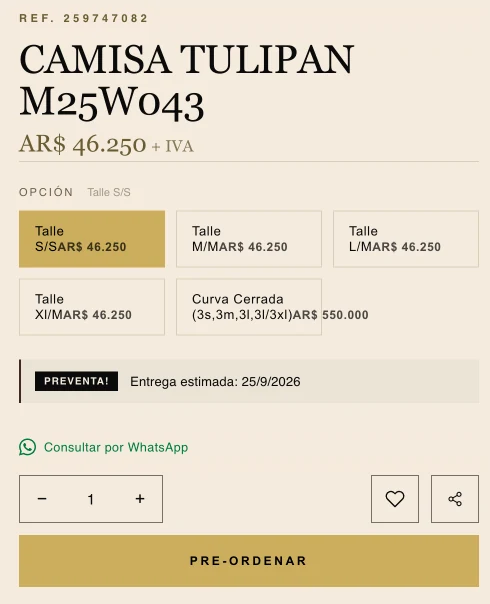
Your customers reserve and pay in full before the goods even exist in your warehouse. You buy exactly what you've already sold, with an estimated date and a quota per variant.

The big ticket, in parts
In wholesale the ticket is high and installments unlock the yes. You define how many and from what amount, per payment method. The price doesn't change and the number is frozen into the order.
Order total · $120,000
3 installments from $500, 6 from $1,500: each method with its own rules. The number is frozen into the order.
On the product page: «in up to 6 installments»
Magazine-grade, built from your own store
Inside your admin there's a builder that assembles the catalog from the products you already have loaded. You pick a template and adjust columns, colors and cover; prices, stock and photos come from your store. Watch it work: every control that gets touched changes the page on the left.
From the classic grid to the full-page photo lookbook, the compact list that fits the most SKUs and the monochrome minimal.
The same build comes out with each list's prices: wholesale, distributor, or with no prices at all, to send to someone who isn't a customer yet.
The online catalog updates itself with your stock and your prices. And if you need it to, it's password-protected.
The same catalog downloads as a print-ready PDF, or as Excel and CSV for whoever prefers a spreadsheet.
Ready-made material for your resellers
The people who buy from you wholesale resell over WhatsApp and Instagram. In your store they get a screen of their own for exactly that: they tick the products they're going to promote and download them — photos, price list and catalog — each with their own prices.

A ZIP sorted by product, sized for social or at original resolution, with the WhatsApp text already written.
Excel and CSV with code, product, category, price, photo and link. With prices, without prices, or both versions.
Printable, with photo, name, code and price, and your store's brand on top.
One button per product that sends name, code, price, description and link over WhatsApp.
Every reseller downloads with their own prices. You set it up once and they sell for you.
Your ERP, your payments and your ads, connected
Your invoicing, your payments and your ads connect to the store from the admin: ten ERPs, Mercado Pago, Meta and more than thirty services. No plugins, no development and no hidden costs.
Contabilium · Dragonfish · Dux · Bling · Ninox · Acqua · Xagro · Virtual Seller · Non Sistemas · ERPs SaaS
Your store stops being an island
A real REST API, with a Bearer token: orders, stock, customers and SKUs travel both ways between your store and your ERP, your CRM or that custom app you had built. And because it's flat REST and documented from within, an AI agent — Claude, Codex, whichever you use — handles it just as well as your developer.
# push today's stock, a whole batch in one call
curl -X POST https://api.ventasxmayor.com/v1/stock-update \
-H "Authorization: Bearer vxm_live_a1b9…f47c" \
-d '{"skus":[{"sku":"1R212","qty":48},{"sku":"M25W043","qty":12}]}' 200 OK { "updated": 2, "not_found": 0 }You hand the token to Claude or Codex and it checks stock, fixes prices, pulls the day's orders or registers customers — just by talking to it in plain English. With nobody writing the integration.
There's a console inside the admin that hits your real endpoints. Start with a sandbox business before plugging in the production ERP.
No SDK, no SOAP: JSON, a token and you're in. Payloads go in batches, so syncing thousands of SKUs is a single call.
Ten ERPs come connected out of the box. The API is for whatever your operation has of its own.
No apps, no plugins and no commission on sales. If you're already a customer, every system switches on from your admin. If you're not yet, your store can be running this week.
 Facial mask + exfoliant · Ruby Skin from $6,200
  Manual facial cleanser · silicone $5.050
  Night mask · hyaluronic acid $3.147
  Facial brush set · x4 $4.890
  Honey facial mask · Ruby Skin $2.560
  Skin care kit · facial care set $8.900


