Skip to content
VentasxMayor - B2B ecommerce platform for wholesalers
  • Platform

    Learn why we're made for wholesalers.

    Selling Wholesales

    Learn about the tools we have to sell wholesale online.

    Administer

    Learn how you can manage your products, customers, orders, and more.

    Grow

    Learn how you can expand your wholesale sales and reach new customers.

    Vendors

    Learn how to digitize your team of Sellers so that they can manage their customers and orders.

    Auto seller TM

    Remarketing that analyzes the behavior of your customers and automatically follows them so that they make purchases without lifting a finger.

    Support

    We will help you, with everything you need and at all times.

    Structure

    Enterprise-grade digital infrastructure, ready to grow with you

    We are Passwordless

    Clients and managers, access securely and without having to remember passwords.

  • Bazaar and Decoration

    Show your online wholesale catalog and manage orders in a simple and professional way.

    Apparel and Footwear

    Sell by sizes, colors and packs, with prices by scale and stock control in real time.

    Book Store, Toy Store, Office

    Organize products by category and allow your customers to shop online without errors or delays.

    Hardware, Construction and Parts

    Digitize your technical catalog and facilitate wholesale orders with variants, spare parts and price lists.

    Technology and Home Appliances

    Update prices and stock instantly and integrate your systems to automate wholesale sales.

    Cosmetics and Perfumery

    Show your professional lines by presentation or fragrance and easily generate recurring orders.

    Food and Beverages

    Manage stock by batch, control refills and facilitate wholesale purchases from any device.

    Other Items

    Fully adaptable to your sector so you can sell online and scale your wholesale channel.

  • Try
  • Integrations

    Learn about all the integrated platforms to expand your capabilities.

    Requirements to get started

    Everything you need to collect to launch your B2B store.

    B2B Marketing Guide

    Our marketing guide designed to help you scale your wholesale channel.

    Partners

    Our partner program for Marketing Agencies and Resellers

  • Price
  • Let's talk
πŸ‡¦πŸ‡· ArgentinaπŸ‡§πŸ‡· BrasilπŸ‡΅πŸ‡Ύ ParaguayπŸ‡ΊπŸ‡Έ United StatesπŸ‡¨πŸ‡± ChileπŸ‡¨πŸ‡΄ ColombiaπŸ‡ΊπŸ‡Ύ UruguayπŸ‡²πŸ‡½ MΓ©xicoπŸ‡΅πŸ‡ͺ PerΓΊ
Select country
πŸ‡¦πŸ‡·ArgentinaπŸ‡§πŸ‡·BrasilπŸ‡΅πŸ‡ΎParaguayπŸ‡ΊπŸ‡ΈUnited States✓πŸ‡¨πŸ‡±ChileπŸ‡¨πŸ‡΄ColombiaπŸ‡ΊπŸ‡ΎUruguayπŸ‡²πŸ‡½MΓ©xicoπŸ‡΅πŸ‡ͺPerΓΊ


Online collections through Mercado Pago

(Made for wholesalers)

What can I do with this integration?

  • Collect your orders online using Mercado Pago money and credit or debit cards. See all payment options here.
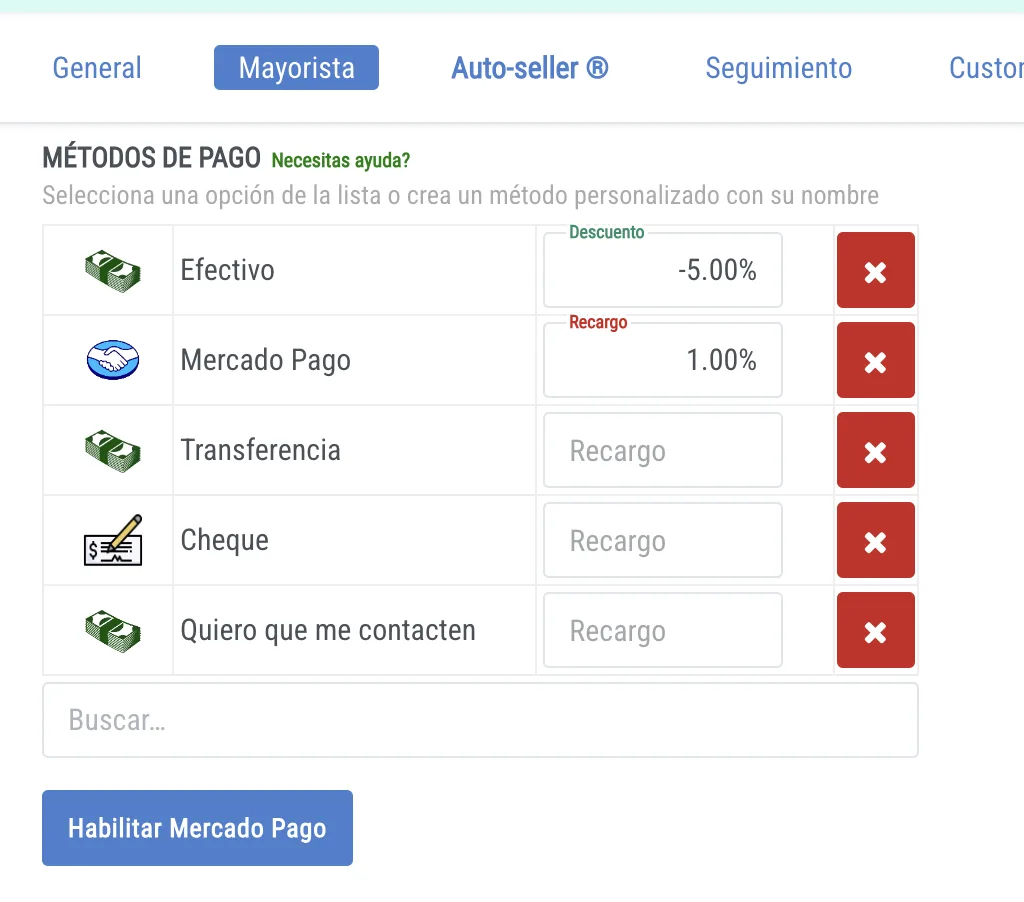
  • Generate surcharges or discounts on your payment methods through Mercado Pago.
  • Edit orders and refund or request money differences.
  • Know the online payment status of your orders.

______________________________________________________________________________________

How to use this integration?

  1. In the WHOLESALE section of your administrator, you now have the option to ENABLE MERCADO PAGO.
  2. Click on this option, follow the steps in Mercado Pago and your account will be linked to make payments. It's so easy!
  3. All payment methods that you create and that contain the word β€œMercado Pago” in their name will generate the payment button at the customer's checkout when they choose these payment option (s).


Once connected, if you later want to disable the payment system, you do so with the same button.

Add Surcharges or Discounts

  • You can add surcharges or discounts to all payment options, including payment by Mercado Pago. This will add a surcharge or discount to the total amount to be paid for the order.
  • These options, once saved, will be available to your customers at the checkout of your store.

To see more about payment methods go here

______________________________________________________________________________________

Understanding how to use the payment system:

We know that your wholesale orders may change. Therefore, the payment system includes the possibility of:

  1. Charge online
  2. Request an outstanding balance of money
  3. Refund partial money
  4. Cancel an order and refund the total
  5. Resolve an order using another payment method

1. Charge

When a customer places an order and requests to pay online, there are two scenarios:

  • Place the order and complete the online payment:
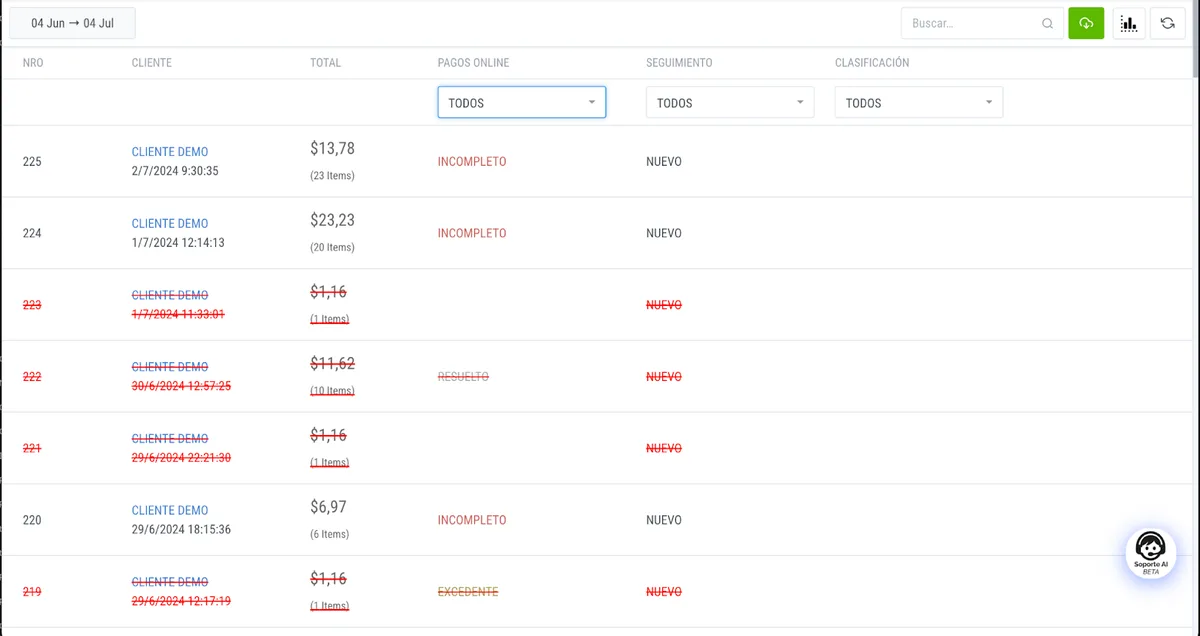
  • In this case, you will see the order as ACCREDITED, which means that the total amount of the order was paid.
  • You place the order and do not complete the online payment:
  • In this case, you will see the order as INCOMPLETE, which means that the order was not paid, but it allows you to send him an email to pay for it if you enter the order.

2. Request an Outstanding Money Balance

  • When editing an order, you can add more products and, when you save, the difference to be paid will be calculated and will allow you to request the outstanding money from them.
  • The order will be classified as INCOMPLETE in the order list.

3. Refund Partial Money

  • If you edit an order and remove items that for some reason are not available, saving the change will generate a balance in favor of the customer.
  • You can refund your money with the refund button. The order will be classified as EXCESS in the order list.

4. Cancel an Order and Refund the Total

  • If you decide to cancel an order that was paid, it will be canceled and a balance will be generated in favor of the customer.
  • You can refund the full amount of money to the customer and thus cancel their payment.

5. Resolve an Order by Another Payment Method

  • You may decide that the payment will be made by another means.
  • In this case, click Cancel Online Billing within an order, and the order is automatically classified as RESOLVED on the order list.

Online Payment Control and Tracking:

On the ORDERS screen, once this function is activated, you will see the online payment column with the different payment statuses for each order so that you can give them control and follow-up. You can also filter orders based on payment status.

______________________________________________________________________________________

logo salesxmayor

B2B eCommerce platform made for Wholesalers, Importers, Distributors and Manufacturers.

Get Free Advice With an Expert

Contact us

Whatsapp
+1 209 219 4091
Email
hola@ventasxmayor.com

Platform

  • Features
  • Vendors
  • Support
  • Grow
  • Administer
  • Try demos

+Info

  • Cost of use
  • Try
  • Platform Status

Β© 2026 SalesXMayor. All rights reserved.

Privacy Policy - Terms of Service

πŸ‘‹
Want to sell more?
Discover how VentasxMayor can transform your wholesale business
πŸ“¦
VxM Bot AI
Your B2B sales consultant
Today
Hello! I'm the VentasxMayor virtual consultant. I'm here to show you how our platform can help you scale your wholesale business. Want to learn more about our solutions or schedule a demo?
VxM AI
AI-generated content may be inaccurate. Always review important information before making decisions.