
From spreadsheet to product catalog: turning an Excel price list into a catalog wholesale buyers can order from
For the wholesaler, distributor or manufacturer whose catalog is an Excel file sent by email, and whose every price change means a new version in every buyer's inbox. What a spreadsheet needs before it can become a catalog, how to clean it, and which kind of catalog to turn it into.

It's Monday and a supplier raised prices. You update the spreadsheet, export it, and email it to two hundred accounts. By Wednesday, three buyers have ordered from last month's file, one ordered a size you dropped in August, and someone on your team is retyping an order that came back as a photo of a printout. The catalog was never the problem. The problem is that a spreadsheet is a fine place to keep a catalog and a poor place for a buyer to order from.
Turning that spreadsheet into a product catalog is mostly cleanup, not design. This guide covers the columns a wholesale catalog needs, how to fix the file before converting it, the three kinds of catalog you can turn it into, and what changes when buyers order from the catalog instead of replying to an email.
Why the spreadsheet stops working as a catalog
A spreadsheet holds the data well. It fails at four things a catalog has to do:
- It has no single current version. Every email creates a copy. Buyers keep the one they opened, not the one you sent last.
- It shows one price to everyone. If your distributors, retailers and key accounts pay different prices, you end up keeping several files, or one file with every price in it, which is worse.
- It doesn't show the product. A cell with "Tee crew neck BLK M" sells nothing to a buyer who has never seen it.
- It doesn't take orders. The order comes back as an email, a PDF or a phone call, and somebody types it in again.
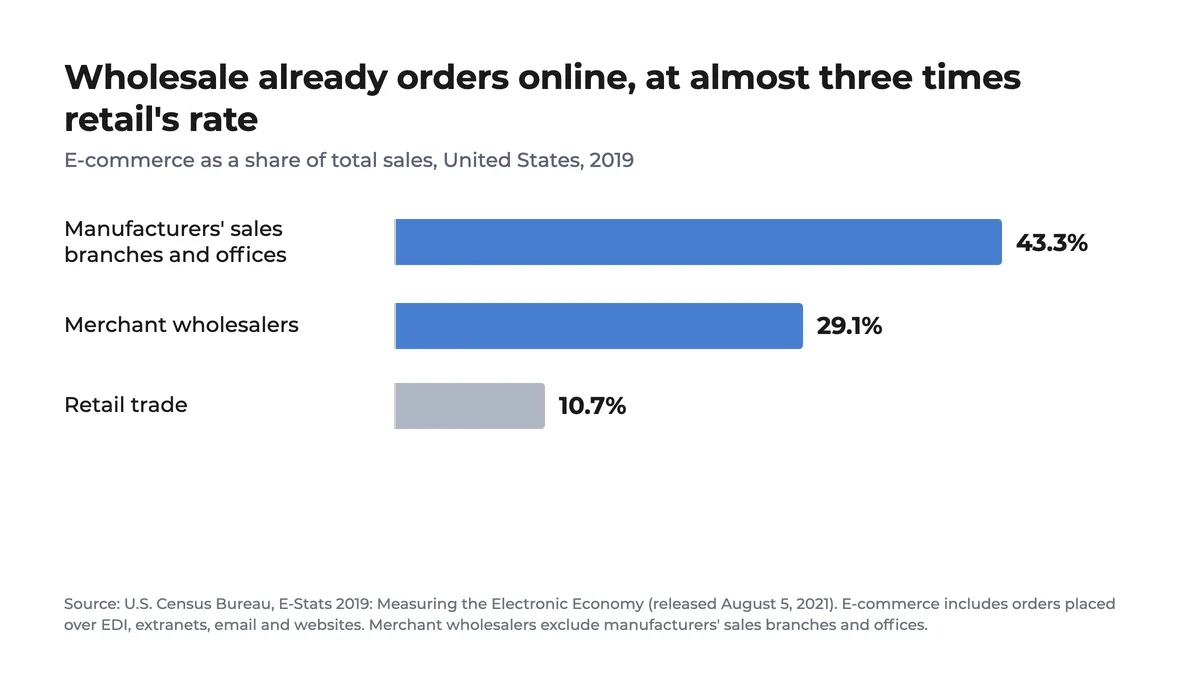
Buyers already order this way from other suppliers. In U.S. wholesale, e-commerce is not new: the Census Bureau counts it at 29.1% of merchant wholesalers' sales in 2019, almost three times retail's share, and the Census counts orders placed over EDI, extranets and email as well as online stores.
The columns a spreadsheet needs to become a product catalog
The rule that makes everything else work: one row per variant. If a product comes in three sizes and two colors, that's six rows, each with its own SKU, sharing the same product name. The name groups them into one product on the catalog page; the SKU keeps them apart for stock and orders.
| Column | What goes in it | Needed? |
|---|---|---|
| SKU | A unique code per row. It also names the image files later. | Yes |
| Product name | The commercial name, without size or color in it. | Yes |
| Options | One column per option type: color, size, scent, voltage. | If there are variants |
| Category | With hierarchy if you have it: Home › Candles › Jar candles. | Yes |
| Units per pack | How many units come in what you actually sell: a case of 12, a pack of 6. | Strongly recommended |
| Minimum order | The least a buyer can take of that item, in packs or units. | Optional |
| Price, one column per list | Wholesale, distributor, key account. Each list is a column, not a separate file. | Yes |
| Short description | One line a buyer reads next to the price. | Recommended |
| Image file name | Or name the image files after the SKU and skip this column. | Recommended |
The column-by-column version, with a full variant example and the mistakes that delay an import most, is in our guide to the product spreadsheet.
Clean the spreadsheet before you convert it
Every catalog tool, from a PDF generator to a full B2B store, reads the same file. The cleanup is what decides whether the conversion takes an afternoon or a month of back-and-forth.
- Split the variants out of the name. "Jar candle 8oz Vanilla" becomes the name "Jar candle 8oz" plus a Scent column with "Vanilla".
- Give every row its own SKU. Duplicated or blank codes are the first thing an import rejects.
- Add units per pack. A price per unit and an order per case don't match unless the file says how many units a case holds.
- Turn price files into price columns. If you keep a "distributors.xlsx" and a "retailers.xlsx", merge them: same rows, one price column per list.
- Normalize the categories. "Candles", "candle" and "CANDLES" are three categories to a computer.
- Rename the photos after the SKU. IMG_4471.jpg tells nobody anything; JC8-VAN.jpg matches itself to the row.
Most of the work is in steps 1 and 4. A file that comes out of an inventory or accounting system usually already has SKUs and categories; what it rarely has is variants split out and one column per price list.
PDF, line sheet or online catalog: which one to build
The same clean spreadsheet can become three different things. They solve different problems, and many wholesalers end up needing two of them.
| Output | Good for | Where it falls short |
|---|---|---|
| PDF catalog | Trade shows, printed books, buyers who want to browse offline. | Frozen on the day you export it. Orders still come back by email. |
| Line sheet | Showing a season or a collection with prices and an order form. | One price list per file. The order form gets retyped. |
| Online catalog buyers log in to | Ordering. Each buyer sees their own prices and current stock. | Needs the clean spreadsheet once; after that, changes go to one place. |
The PDF doesn't go away when the online catalog arrives. The difference is where it comes from: printed out of the live catalog with today's prices, instead of being the catalog.
From product catalog to orders
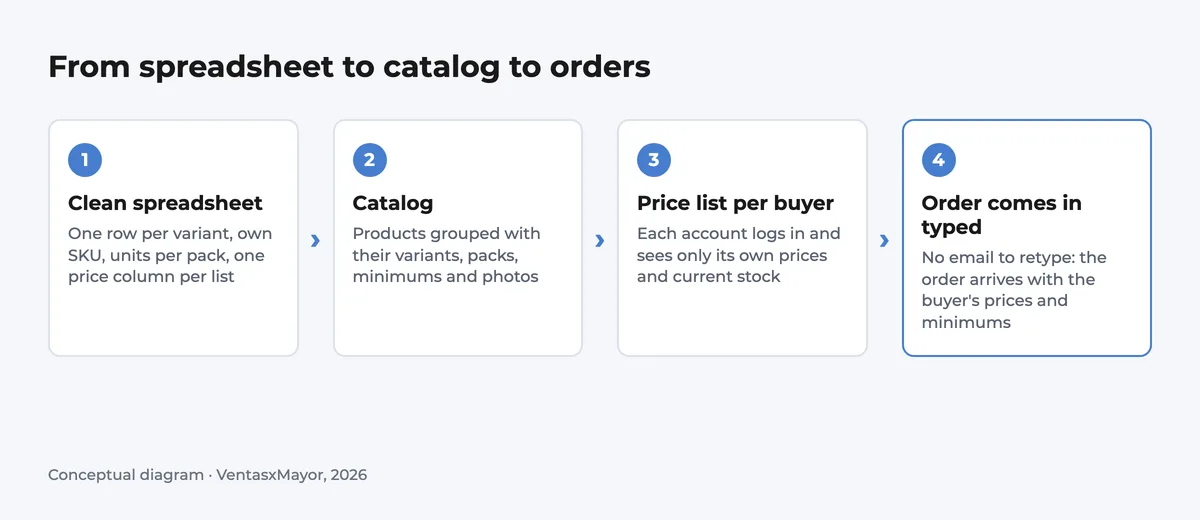
How VentasxMayor turns the spreadsheet into a catalog
On VentasxMayor, implementation is included: you send the spreadsheet and we migrate your catalog, set up the store with your brand, and connect your domain and payments. Each customer logs in and orders at the price list you assign them. From the same live catalog, the catalog builder exports a link, a print-ready PDF or an Excel file with each price list's numbers, so the PDF for the trade show and the online catalog never disagree. If you're still deciding between a portal and a full store, our guide to B2B ordering systems compares them.
Checklist before you convert the spreadsheet
- One row per variant, each with its own SKU
- Product names without size, color or scent inside them
- One column per option type
- Units per pack on every row you sell by the case
- One price column per price list, in a single file
- Categories spelled one way, with hierarchy if you have it
- Photos renamed after the SKU
- Minimum order per item where it applies
Frequently asked questions
How do I make a product catalog from an Excel spreadsheet?+
Clean the file first: one row per variant with its own SKU, variants split out of the product name, units per pack, and one price column per price list. Then import it into a catalog tool, a PDF generator or a B2B store. The tool matters less than the cleanup.
What columns does a wholesale product catalog need?+
At minimum: SKU, product name, category and price. For wholesale, add units per pack, minimum order, one column per option type and one price column per price list. A short description and photos named after the SKU make the catalog usable for buyers.
Is a PDF catalog enough for wholesale buyers?+
For browsing, often yes. For ordering, no: a PDF shows one set of prices, goes out of date the day you send it, and the order still comes back by email. Most wholesalers keep a PDF for trade shows and move ordering to an online catalog where each buyer sees their own prices.
How do I show different prices to different customers in one catalog?+
Keep one price column per list in the spreadsheet and use a catalog that assigns a price list to each customer account. The buyer logs in and sees only their prices. Sending a different file to each group is what creates the version problem in the first place.
Sources
Next step
Send us the spreadsheet
On VentasxMayor, implementation is included: we migrate your catalog from your spreadsheet, set up the store with your brand and connect your domain. Each customer then logs in and orders at their own price list.
B2B ordering system: what it is, how it differs from a B2B store, and what happens to your reps
The three things vendors call a B2B ordering system, the portal-vs-store comparison, why the rep decides whether it gets used, the features in order, and published prices as of October 2026.

Ecommerce for distributors: how to move your orders from the phone to a store your customers run themselves
What ecommerce means for a distributor whose orders come by phone, email and WhatsApp: the Tuesday test, the features in order of importance, published prices, and a four-week rollout.

A B2B ecommerce website, for a wholesaler your size: what it has to have, what it costs, how long it takes
The 12 features a B2B ecommerce site needs for a wholesaler, what the platforms that publish prices charge, the two costs that aren't on any pricing page, and a realistic launch timeline.