
B2B customer portal: what it is, what it needs and how to roll it out
For the wholesaler, distributor or manufacturer who wants customers ordering on their own without losing control of price, credit or the rep. What a customer portal is, what it needs, how it differs from a rep portal and from an online store, and five steps to launch it.
When a wholesaler says "I want a portal for my customers", they are almost never asking for an online store. They are asking for the corner-store owner to stop sending voice notes at 10 pm, for the hardware store to see its price without calling, and for the order an admin transcribes today to go straight into the system. It is an operations problem, not a marketing one.
We have been hearing that request for more than eight years, and we also see the most common mistake in answering it: putting a consumer store behind a password and calling it a "B2B portal". This guide explains what a real B2B customer portal is, what it needs to have for a wholesaler, how it differs from a rep portal and an online store, and how to launch it without breaking the operation.
What is a B2B customer portal
A B2B customer portal is the private site where each of a wholesaler’s customers logs in and sees their own price list, available credit, stock and order history, and builds and confirms the order from there without calling anyone. It is also called a self-service or ordering portal.
What sets it apart from a regular online store is one thing: terms are per customer. There is no public price; there is the list the company assigned to that customer, with their discount, minimum order and payment terms. A portal that shows the same price to everyone who logs in is not B2B: it is a consumer store behind a password.
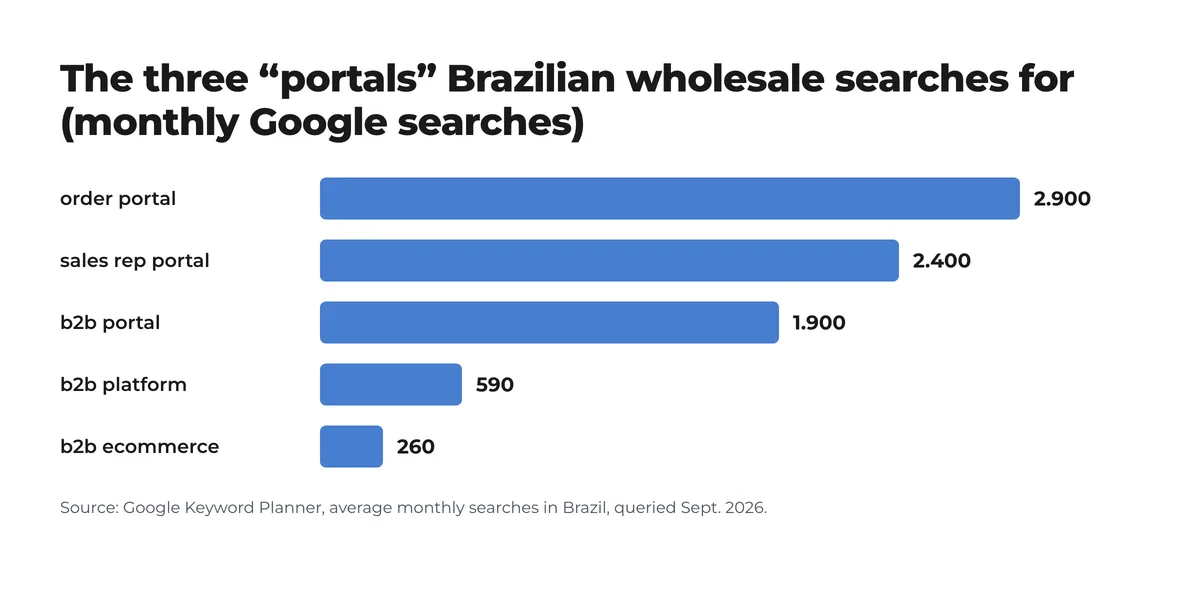
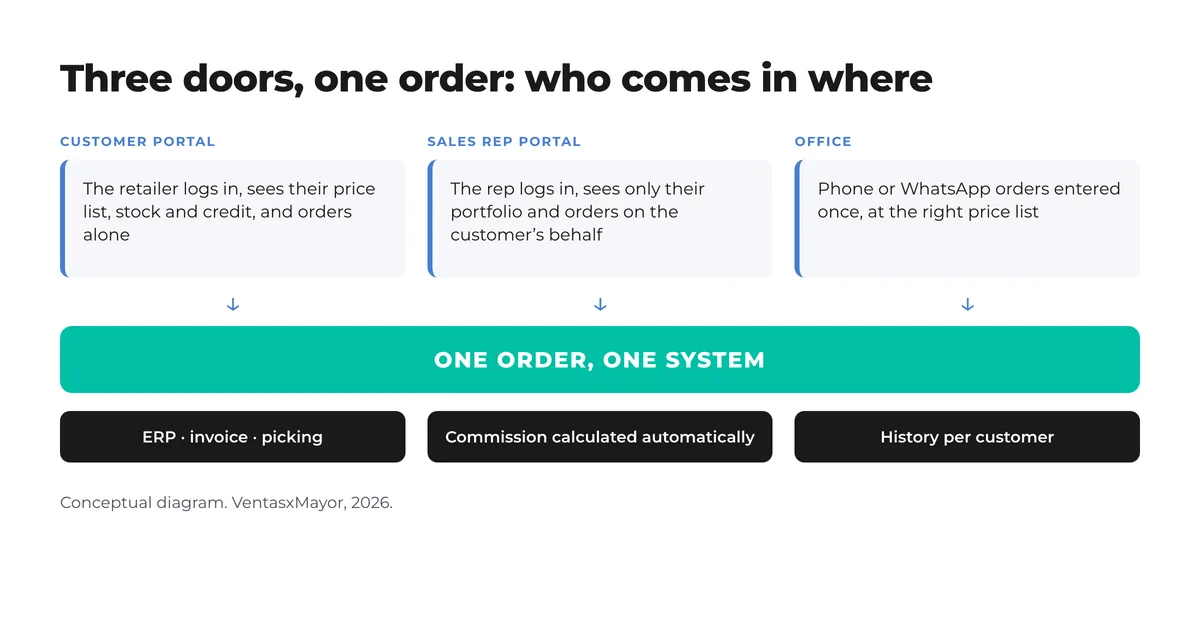
In practice three "portals" coexist that people search for separately and that are doors into the same system: the customer portal (the buyer orders alone), the sales rep portal (the rep or route rep orders on behalf of their accounts) and the ordering portal, which is usually what the operation calls the whole thing. If the three do not land in the same place, you have three systems.
What a B2B portal needs for a wholesaler
- Price list per customer, with its own discount and minimum order, assigned when the account is approved. This is the feature that defines everything else.
- Sign-up with approval. The customer registers with their business details and sees no prices until the company approves them and assigns terms.
- Catalog with live stock and selling units: case, pack, pallet; the order in the units it ships in.
- Fast multi-line ordering: a customer buying 80 SKUs a week cannot go one by one through product photos.
- Account and credit: balance, limit and due dates visible; an order over the limit is held, not lost.
- History and reorder, which is how most recurring customers buy.
- ERP integration: prices and stock come from the back office, and the order goes back into it without anyone keying it in.
- Assigned rep: every order, whoever enters it, is attributed to someone’s portfolio.
A consumer store behind a password is not a B2B platform, and "Shopify or WooCommerce plus a few apps" is not either. If per-customer pricing, minimums and account terms are not native, each of those apps is a point where the order breaks.
Customer portal, rep portal and online store: the differences
| Customer portal | Sales rep portal | B2C online store | |
|---|---|---|---|
| Who logs in | The retailer, with their user | The rep, with theirs | Anyone |
| Which price they see | Their own | The price of the customer being served | The same for everyone |
| Who enters the order | The customer | The rep, on the customer’s behalf | The consumer |
| Payment | On account, terms, credit limit | Per the customer’s terms | Card at checkout |
| What it is for | Reordering without calling | Portfolio, visits, commission | Selling to the public |
What changes when the customer orders alone
- 2/3of B2B buyers prefer remote interactions or digital self-service over in-person visitsMcKinsey B2B Pulse, 2024
- 80%of B2B sales interactions happen in digital channels from 2025, per Gartner’s projectionGartner, 2020
The buyer has already changed: the store owner would rather enter the order at closing time, with price and stock in view, than wait for Thursday’s rep or send a voice note. What the portal takes off the operation is concrete: the replenishment order, which repeats every week, stops going through the phone and the spreadsheet; price and quantity errors drop because the order is born with the right list; and the rep, who until now was transcribing, is free to open accounts, win back the customer who stopped ordering and sell new lines. The order the customer entered alone still belongs to the rep’s portfolio and still earns their commission.
How to roll out a B2B portal in five steps
- Reproduce the real commercial rules. Before touching anything: how many price lists actually exist, what minimum each customer type has, who buys on terms and up to what. A portal launched without this reproduces the chaos with a new interface.
- Clean the catalog. Unique codes, clear selling units, photos and stock people can trust. The catalog sent as a PDF today is the starting point, not the destination.
- Assign portfolios and terms per customer. Each customer with their list, minimum, credit and rep. This is the company’s job, not the platform’s.
- Pilot with the 30 or 40 customers who order most over WhatsApp. They gain the most from the change and will be the first to say what is missing. The rep walks them through the first order.
- Measure and open to the rest. Share of orders entered alone, orders outside business hours, errors per order, customers who stopped ordering. Those four numbers decide when to open the door to the whole portfolio.
On timing: with the commercial rules clear and the catalog clean, a portal like VentasxMayor’s is implemented in days, not months, because per-customer price lists, minimums, account terms, the rep with a portfolio and the ERP integration are native. What takes time is not the platform: it is sorting out the rules in step 1.
Checklist before launching the portal
- Every customer has a price list, minimum, payment terms and rep assigned.
- The catalog has unique codes, selling units and stock updated from the ERP.
- New customer sign-ups go through approval before prices are shown.
- An order over the credit limit is held with a notice, not silently rejected.
- There is a published cut-off time for next-day shipping.
- The rep is notified of every order in their portfolio, whoever enters it.
- WhatsApp stays a channel for notices and questions, not the ordering system.
- Four numbers are tracked from day one: orders entered alone, orders after hours, errors, inactive customers.
Frequently asked questions
What is a B2B customer portal?+
It is the private site where each business customer of a wholesaler logs in and sees their own price list, credit, stock and history, and places the order alone from there. The difference from an online store is that terms are per customer, not public.
What is the difference between an ordering portal and an online store?+
The online store shows a public price and charges at checkout; the ordering portal shows each customer their list, minimum and terms, and the order is invoiced on account. The portal usually also has a way in for the rep, who orders on behalf of their portfolio.
Do I need an ERP to launch a B2B portal?+
Not to start: the portal can manage catalog, customers, prices and orders on its own. It is worth integrating if the ERP is already the source of prices and stock, so the order is not re-entered and stock is not shown out of date.
How long does it take to implement a customer portal?+
The platform, days. What takes time is the groundwork: defining how many price lists exist, each customer’s minimum and credit, and cleaning the catalog. A company with that in order launches the pilot the same week.
Does the rep lose commission if the customer orders alone?+
It should not. If the portal has a rep assigned per customer, every order lands in someone’s portfolio and commission is calculated the same way. That is what makes the rep push the portal instead of resisting it.
Sources
- B2B Pulse — McKinsey & Company, 2024
- Gartner Says 80% of B2B Sales Interactions Between Suppliers and Buyers Will Occur in Digital Channels by 2025 — Gartner, Sept. 2020
- Portal B2B do cliente: mais conversões e fidelidade — Shopify Brasil, dezembro de 2025
- Google Keyword Planner — média mensal de buscas no Brasil, consulta de setembro de 2026
Next step
A portal where every customer sees their price and orders alone
In VentasxMayor each customer logs in and sees their price list, minimum, account and history; the rep sees their portfolio and gets notified of every order; the ERP receives everything through the integration.
Outside sales rep in wholesale: the job, the pay and how a portal changes it
What an outside rep does at a wholesaler, how reps are paid, how the role differs from route and inside sales, and what changes with a portal where the order is entered once.
What is a pre-sell rep: the job, the pay and how online ordering changes it
The pre-sell rep visits stores on a fixed route and takes the order the delivery route ships later. The job, the pay, how it differs from van sales and how distributors run pre-sell.
Wholesale price list by customer: how to stop emailing 5 different spreadsheets
One master list, three to five tiers, per-customer discounts and an effective-date policy. The method for ending the spreadsheet chase and invoicing the right price.