
ERP integration for a B2B store: what to sync and what not to
For the wholesaler who already has an online store but still fixes orders by hand because the ERP's stock never matches the website's. Covers what to sync in real time, what can wait, and the 6 mistakes that break stock.
The order comes in at nine in the morning through the online store, which deducts the stock right there. The ERP doesn't find out until the afternoon, when someone exports a spreadsheet and re-enters it by hand. At eleven, another customer buys the last four units of that same item over WhatsApp, with no idea they're already gone. At four, once the spreadsheet finally lands in the system, there are two confirmed orders against the same stock, and someone has to call to cancel one.
This is not bad luck or a distracted rep. It happens because the store and the ERP work like two systems mailing each other one letter a day. It shows up constantly in wholesalers who already digitized the order but not the sync: a tidy storefront on the outside, an ERP that is still the only source of truth on the inside, and nobody making them talk to each other at the moment it matters. The fix is not more spreadsheets or more people comparing two screens. It's deciding what information has to travel right now and what can wait.
What ERP integration with a B2B store actually means (and what it doesn't)
Integration is not a plugin sitting installed, nor a spreadsheet exported once a week. It means the catalog, each customer's price, available stock, order status and account balance live in one source of truth, with the store and the ERP updating each other automatically in both directions. What isn't integration: entering the same item by hand in two systems, an office worker comparing two screens to check stock, or a file someone uploads "when they remember."
Scale no longer forgives that model. B2B e-commerce in Latin America moved close to USD 200 billion in 2025 and is growing at roughly 22% a year through 2028, according to Statista. At that growth rate, a three- or four-hour stock lag stops being a minor annoyance and turns into money lost every day: cancelled orders, customers buying elsewhere, and office hours spent fixing what the store promised wrong.
What has to sync in real time and what can wait
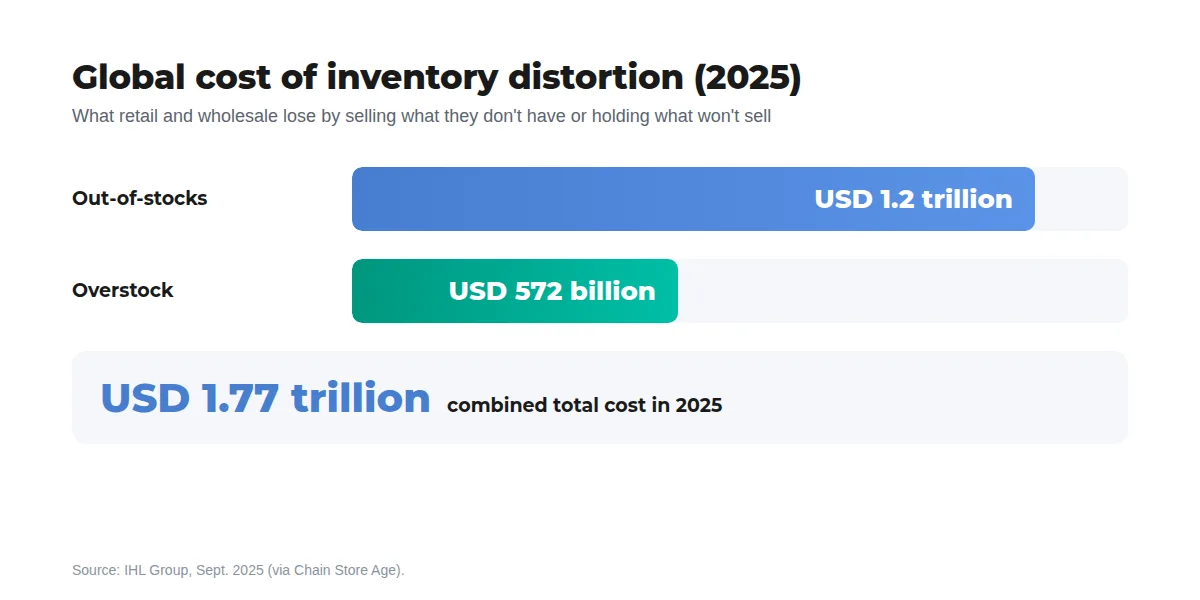
Not everything needs to travel in real time. Forcing all of it does adds parts to maintain and failure points with no real payoff. But some data, if it arrives late, produces an order that can't be fulfilled:
| Data | When it has to travel | Why |
|---|---|---|
| Available stock by warehouse | Real time | It's the first thing oversold if it arrives late |
| Customer price, tier and discount | Real time | A stale price lands on the order and has to be fixed before invoicing |
| Account balance and credit limit | Real time | Without this, the store accepts orders the ERP would never approve |
| New items, spec sheets, images | Batch (hours) | It doesn't change between morning and afternoon |
| Bulk price updates for inflation or FX | Batch (scheduled) | It applies all at once, not item by item |
If a piece of data, arriving three hours late, can make the store sell something that's already gone, it belongs in real time. If not, it can run on a batch.
The 6 mistakes that break stock
- Syncing total stock without deducting what's reserved. An order that's confirmed but not yet invoiced still counts as available: "phantom stock" shows up, offered by the store but already spoken for in the warehouse.
- Adding every warehouse into one number. If the customer picks up from one specific branch, or there's stock in transit that can't be promised yet, a single total creates orders that can't be delivered the way they were sold.
- Showing the general price list instead of that customer's price. If they have their own tier, a volume discount or a special condition the store doesn't know about, the order comes in wrong and someone has to fix it by hand before invoicing.
- Syncing via a once-a-day file with more than a handful of daily orders. Every file is a stale snapshot the moment it's uploaded: fine for catalog, not for stock or price.
- Letting the store accept orders from a past-due account. If that control only lives inside the ERP, the store keeps taking orders from a customer collections already cut off.
- Double entry between the rep and the ERP. The rep takes the order over WhatsApp or on the road, writes it down, and someone else retypes it into the system. That order never deducted stock in the store because nobody entered it there, and the two sources fall out of sync again.
How to choose an integration model based on the ERP already in place
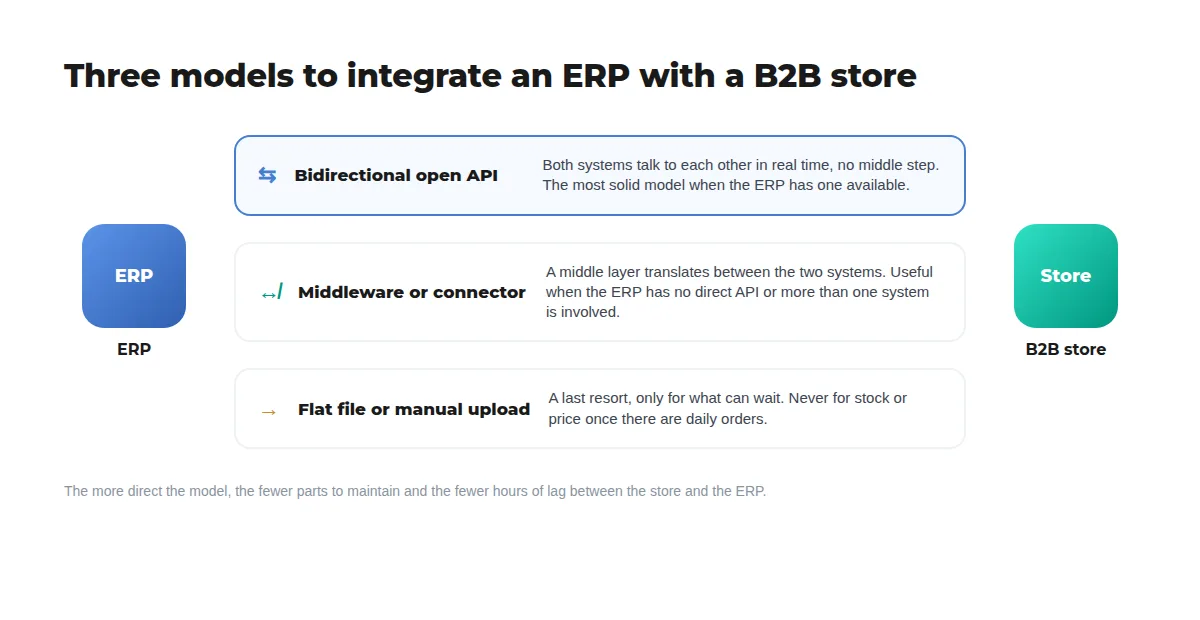
There are three models, from most to least solid:
- Bidirectional open API: the ERP and the store talk to each other in real time, with no middle step. The most solid model when the ERP has one available.
- Middleware or connector: a middle layer translates between the two systems when the ERP doesn't expose a direct API, or when more than one system is involved (ERP, invoicing, logistics). It works, but it's one more piece to maintain.
- Flat file or manual upload: a last resort, only for what can wait, like adding to the catalog. Never for stock or price once there are daily orders.
The list of ERPs worth having a ready-made integration with —Dux Software, Contabilium, Dragonfish, Bling, among others— keeps growing, so before building anything custom it's worth checking what the platform already integrates and what the API of the ERP already in place exposes.
How VentasxMayor solves it
VentasxMayor integrates the B2B store with the market's leading ERPs —Dux Software, Contabilium, Dragonfish, Bling, among others— through an open API, and that list of integrations keeps growing. Available stock, each customer's price and discount, and their account status sync in real time, so the store never sells what the ERP no longer has, nor accepts an order from an account with expired credit. Catalog, spec sheets and images can update on a batch, without forcing everything into real time. And since the order is born in the portal and flows straight to the ERP, the rep stops being the one who retypes by hand what they already took over WhatsApp. All at the same flat monthly price, with no charge per user or per connected rep.
Monday checklist
- List every place stock is written or read today: ERP, spreadsheet, WhatsApp, a rep's memory.
- Split what has to travel in real time (stock, price, account balance) from what can run on a batch (catalog, spec sheets, images).
- Ask whether the ERP has an open API before building any custom integration.
- Decide how reserved stock from a confirmed but not-yet-invoiced order gets deducted.
- Keep in-transit stock separate from stock available to promise, instead of adding them into one number.
- Turn on automatic order blocking when a customer exceeds their account limit.
- Pick a single system as the owner of each customer's price, so nobody rewrites it by hand in the store.
- Measure, for a month, how many orders go out with an item that isn't actually in stock.
- Take the rep out of the job of re-entering into the ERP an order they already took on another channel.
Frequently asked questions
What if the ERP doesn't have an open API?+
It can still be integrated with a middleware or connector that translates between the two systems. What matters is not settling for a manual file for stock and price: that only holds up while order volume stays low.
Does everything have to sync in real time?+
No. Stock, price and account balance do, because an error there produces an order that can't be fulfilled. Catalog, spec sheets and images can update on a batch without any issue.
How long does an ERP-to-B2B-store integration take?+
It depends on the model and how many ERP modules are involved. With an open API and a scope limited to stock, price and orders, it's usually a matter of days; with middleware or several systems involved, it takes longer to configure.
Does the integration replace the sales rep?+
No. It takes the rep out of the job of re-entering into the ERP an order already taken on another channel. They keep selling and building orders for their accounts, but stop retyping by hand what they already wrote somewhere else.
Sources
Next step
Connect the ERP to the store, no spreadsheets in between
In VentasxMayor available stock, each customer's price and their account balance sync with the ERP in real time, through an open API with the market's leading systems. A specialist reviews what is connected today and what can sync directly.

Wholesale price list by customer: how to stop emailing 5 different spreadsheets
One master list, three to five tiers, per-customer discounts and an effective-date policy. The method for ending the spreadsheet chase and invoicing the right price.
Wholesale stock control: how to measure turnover and stop losing money on your inventory
Learn how to calculate stock rotation index, identify dead products and apply strategies to optimize your wholesale inventory.

Automatic discounts for wholesalers: how to build promotions that apply themselves
Volume tiers, BOGO, bundles, free shipping and cascading rules: how automatic discounts work, how they combine, and why order changes the outcome.