
Showing up in ChatGPT: a Business Hub guide for wholesale distributors
OpenAI just opened Business Hub: businesses can claim their ChatGPT profile, correct their details, upload a product feed and launch a Business Agent. This guide covers what a US wholesaler can do today and where account-based pricing gets in the way.
A retailer who needs to restock janitorial supplies doesn't always search Google or call the rep anymore. More and more, they open ChatGPT and type: "where can I buy janitorial supplies wholesale near Houston, net-30, low minimum?". ChatGPT answers with three or four names. If your company isn't one of them, that order never existed for you, and nobody notices.
What we see in a lot of distributors is that their web presence is a brochure site from 2019, a phone number and a PDF price sheet emailed every Monday. A PDF sent every week isn't going digital, and it's invisible: ChatGPT doesn't read what sits in your customers' inboxes. It cites websites.
On November 10, 2026 OpenAI launched Businesses in ChatGPT in beta. For the first time a company can claim its profile inside ChatGPT, fix what it says, connect a product feed and see how often it shows up. In the US, eligible ecommerce businesses can also launch a Business Agent. This guide separates what matters for a wholesaler from the noise.
What OpenAI launched to help businesses show up in ChatGPT
The launch has three parts, and it pays to keep them apart because each has its own rules and markets:
- Business Hub: the dashboard where a company claims its profile, verifies it and edits its details (website, description, category, logo, delivery and return policies). It's also where you connect a product feed with prices and availability.
- Insights: aggregated metrics for the last 28 days. Mentions, website clicks and "discovery topics", the themes of the answers your business appeared in.
- Business Agents: your own chat inside ChatGPT, separate and clearly labeled, that answers questions using the information you provide. Available to eligible US ecommerce and online service businesses.
All three are free during the beta. OpenAI hasn't ruled out charging later. And there's a fourth piece that already existed: ChatGPT ads, which can now send people to your Business Agent.
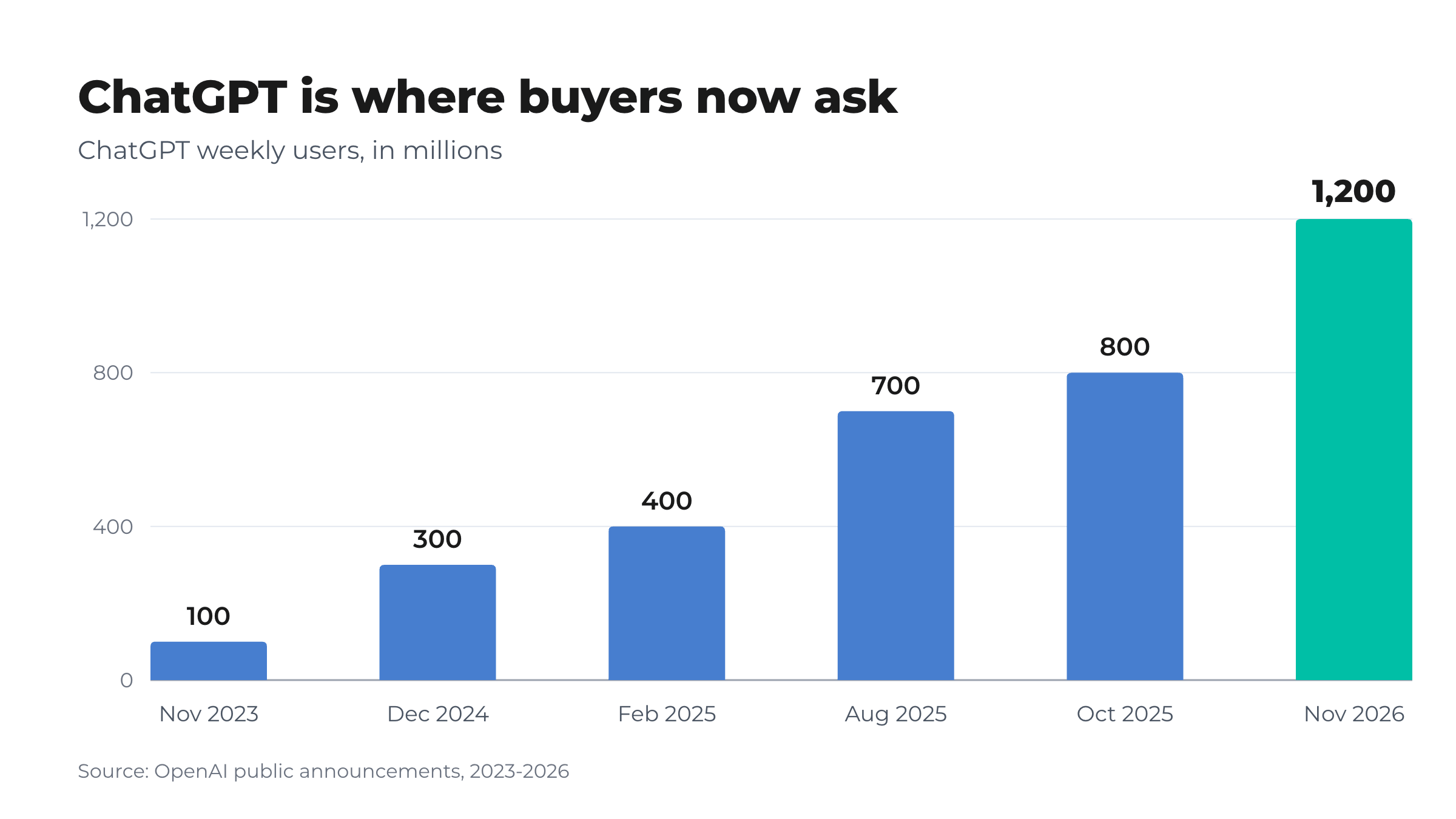
- 1.2Bpeople use ChatGPT every weekOpenAI, nov 2026
- 89countries with ChatGPT ads, including Mexico, Brazil, Argentina and ChileOpenAI, oct 2026
- 28days of history shown in Business Hub InsightsOpenAI Help Center, nov 2026
What works in the US today, and what's still limited
Most of the videos going around show a Business Agent chatting with customers. In the US that's real: eligible ecommerce and online service businesses with a website can build, test and publish one. The catch is the word "eligible": OpenAI reviews both the business category and the agent's intended use, and business verification alone doesn't guarantee an agent. Outside the US, companies can claim a profile but not publish an agent yet.
| Piece | United States | Outside the US |
|---|---|---|
| Claim and verify the profile | Yes | Yes, where verification is supported (beta) |
| Edit details: website, description, logo, delivery, returns | Yes, after identity verification | Yes, after identity verification |
| Insights: mentions, clicks, topics | Yes | Yes, above minimum activity thresholds |
| Product feed with prices | Yes, CSV upload or hosted URL | Standard uploads target the US (the format also covers Canada and Mexico) |
| Business Agent | Yes, eligible ecommerce and online services | Not yet |
| ChatGPT ads | Yes | 89 countries |
| Physical stores | Existing listings only | Not yet |
The practical read: for a US distributor, Business Hub is a discovery channel with three levers you control (profile, feed, agent) and one you don't (ChatGPT's independent answers). Claiming doesn't make ChatGPT recommend you more often, and ads don't change its answers. What it does is make sure that when you do come up, the details are right.
How to claim your business in ChatGPT, step by step
You don't need an ads account or an Enterprise agreement. Any ChatGPT account belonging to someone authorized to represent the business will do.
- Open Business Hub. From the ChatGPT sidebar, or at chatgpt.com/business-hub. Search for your business by name.
- Pick the listing or add it. If it's there, select it. If it isn't and you run an online business, you may see an option to add it.
- Verify the claim. Four routes: a code by text or automated call to the business phone, a code to the business email, a TXT record in your domain's DNS, or connecting a Shopify store.
- Wait for approval. OpenAI reviews the claim and emails you its decision.
- Verify your identity with Persona. Without it you can't publish changes, connect a feed, see insights or create an agent. Expect a government ID, business registration details and proof you're authorized. Approval adds the blue check.
- Fill in the profile. Website, description, category, logo, delivery policy, return policy and a cover photo. OpenAI reviews each change before it goes live.
- Add your team. The admin who claimed the business can add teammates or grant an agency access, each with their own ChatGPT account.
The legal name, address and registration or tax number you give Persona must match your official records. A distributor that invoices under one name and markets under another needs to settle which one is official before starting.
What a wholesale profile in ChatGPT should say
Business Hub is built for any business, so the fields are generic. The mistake is filling them in as if you sold to consumers. The retailer asking ChatGPT wants four things before contacting anyone: do you sell wholesale, who do you sell to, what's the minimum and do you deliver to them.
- Description. Say in the first sentence that you're a wholesaler or distributor, what category and which brands. "Janitorial and packaging distributor serving restaurants and retailers across Southeast Texas, 2,000+ SKUs" works. "A dynamic, customer-focused company" doesn't.
- Who you sell to and how pricing works. If pricing shows after an account is approved, say so. Same with net-30 terms: if you offer them, state the conditions.
- Minimum order. OpenAI's Business Agents policy forbids hiding material fees, conditions or limitations when they matter to a user's question. In wholesale, the minimum is material.
- Delivery policy. Service area, lead times, freight terms and the free-freight threshold. It's the field that most separates one distributor from another.
- Return policy. Wholesale is rarely "30 days, no questions asked". Damaged goods, shortage claims, restocking fees, seasonal items: write it as you actually apply it.
- Website. Your ordering site, not a social profile. This matters more than it looks; more on that below.
Wholesale pricing in ChatGPT: the product feed problem
In the US, Business Hub lets you connect a CSV product feed, uploaded or via a hosted URL, with prices and availability. For a retailer this is a no-brainer. For a wholesaler it's a real decision, for three reasons.
One price per item, and it has to be real
Every row needs a positive regular price, formatted like "18.00 USD", and OpenAI's policies forbid inventing prices or using placeholders. A distributor doesn't have one price: it has a price for the small independent store, another for the chain, another for the account that negotiated volume terms. Showing every customer the same price ignores how wholesale actually works, and publishing it in ChatGPT hands it to your competitors too.
Your Google feed won't map one to one
Many wholesale stores already publish a Google Merchant Center feed with a placeholder price precisely to keep account pricing private. That trick doesn't belong in ChatGPT, where misleading prices break the rules. OpenAI's format also requires columns Google's doesn't, like a seller name on every row.
What you can publish without hurting yourself
If you have a public list price, MSRP or a line sold at a single price to everyone, that's a clean feed. If every price depends on the account, skip the feed: a complete profile and well-written product pages on your store do the job, and the price shows once the buyer logs in.
How to measure whether you show up in ChatGPT
Insights is the most useful part of the launch for a wholesaler, because until now there was no way to know whether ChatGPT named you. It has three numbers, each with fine print:
- Mentions. For an online business, a mention counts when ChatGPT references your website. Naming the brand alone doesn't count. No website, nothing to count.
- Website clicks. Clicks from ChatGPT to your site. Not completed visits, not purchases.
- Discovery topics. Themes of the answers you appeared in. No individual prompts or chats: OpenAI doesn't share conversations, including Business Agent chats.
A blank metric doesn't mean zero: activity may not have reached OpenAI's reporting threshold. For the rest of the journey, run Google Analytics 4 on your store: ChatGPT traffic shows up as a chatgpt.com referral, and there you can see whether it turned into an account application or an order.
Where VentasxMayor fits
Claiming the profile is free and takes an afternoon. What Business Hub doesn't solve is what's on the other side of the click. Having technology doesn't mean your operation is digital: if the buyer arrives from ChatGPT and finds a contact form or a PDF, you lose them just like before.
- A website ChatGPT can cite. The wholesale store runs on your own domain, with public product pages and prices only for registered customers. ChatGPT can cite the catalog without exposing account pricing.
- Easier verification. With your own domain, the DNS TXT route is straightforward, and the included business email gives you an address on your domain to receive codes.
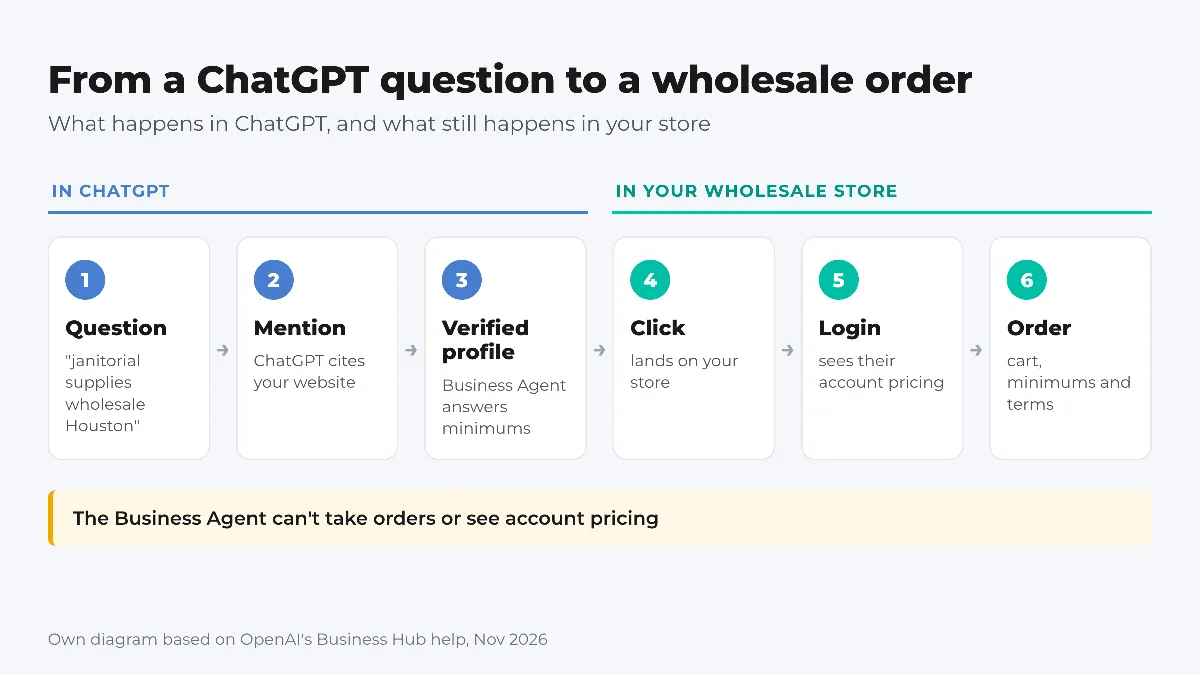
- Each account's price, in your store. OpenAI's Business Agent can't take orders or see account pricing. The store's AI salesperson quotes using each customer's own price list.
- Measurement. Google Analytics 4 and ad pixels connect from the dashboard, so you see what happened to every visit that came from ChatGPT.
One distinction: showing up in ChatGPT is not the same as an AI running your store. For that there are AI agents connected to the store, and for everyday use, our guide to ChatGPT for wholesale ecommerce.
Checklist for this week
- Ask ChatGPT, from an account with no history, what a buyer would ask: "[category] wholesale distributor in [city]". Write down who shows up.
- Decide who claims the profile and have their ID, the business EIN or registration and official address ready.
- Pick a verification route: business phone, an email on your domain or a DNS TXT record.
- Write the description with category, brands, who you sell to and how pricing works, in two or three sentences.
- Add the minimum order, delivery zones and lead times, freight terms and the return policy as you actually apply it.
- Set your ordering site as the website, not a social profile or a PDF.
- Only connect a feed if you have a public price you're happy to show. Never a placeholder.
- If you're eligible, draft a Business Agent that answers minimums, freight and account setup, and test it with real buyer questions.
- Check Insights again in 28 days and compare discovery topics with what your profile says.
Frequently asked questions
How much does Business Hub cost?+
Nothing during the beta: claiming, editing, Insights and, where eligible, publishing a Business Agent are free. OpenAI hasn't ruled out charging later. ChatGPT ads are a separate, paid product.
Will claiming my profile or buying ads make ChatGPT recommend me more?+
No. According to OpenAI, claiming doesn't guarantee more visibility or give you control over ChatGPT's independent answers, and ads don't influence them. What it does is make sure that when you come up, your details are right.
Can a Business Agent take orders or check an account's pricing?+
No. Today the agent explains products and policies and links to your website, where the buyer completes the action. It can't complete purchases, make bookings or look up an order, and it doesn't see account-specific pricing.
Can I reuse my Google Merchant Center feed?+
Not as is. OpenAI's format requires different columns, such as a seller name on every row, and a real, positive price. If your Google feed uses a placeholder price to protect account pricing, don't upload it to ChatGPT.
Sources
- Introducing Businesses in ChatGPT, OpenAI, 10/11/2026
- Setting up your business on ChatGPT, OpenAI Help Center, consultado el 10/11/2026
- Business Agents Policy, OpenAI, 10/11/2026
- Product feed reference, OpenAI Developers, consultado el 10/11/2026
- ChatGPT Ads expands to 26 new countries, OpenAI, 21/10/2026
- OpenAI's new business agents give brands a free way into the conversation, Digiday, 10/11/2026
Next step
Give ChatGPT a real wholesale store to cite
Business Hub counts a mention when ChatGPT cites your website. With VentasxMayor that website is a catalog on your own domain, account pricing behind login and orders 24/7.

How to Use ChatGPT to Improve Your Wholesale eCommerce and Sell More
Discover how to use artificial intelligence to write product descriptions, create marketing campaigns, improve your SEO and sell more.
How to show prices only to registered wholesale customers (without losing Google)
Public catalog without prices, prices after login or a closed store: which to choose, what Google sees and how sign-up with approval works.

AI for wholesale eCommerce: ChatGPT, Claude or Gemini running the store, not just writing descriptions
What an AI agent connected to the wholesale store does (products, prices per list, orders, customers) and how to connect it in 3 steps, no coding.