What is Google Analytics 4 (GA4)?
GA4 is the latest version of Google's data analytics platform, designed to track and analyze user behavior across websites, mobile apps and other digital platforms. It replaces Universal Analytics (UA) and offers a much more powerful measurement model, event-driven and privacy-focused.
GA4 allows wholesale store owners to understand how their buyers interact with their catalog, providing key insights to improve performance, the buying experience and B2B marketing strategies.
Key GA4 features for your wholesale business
- Event-based model: Instead of focusing on sessions and page views, GA4 tracks custom events (clicks, downloads, video views, add-to-cart actions) for a much more detailed analysis of your B2B sales funnel.
- Multichannel analysis: Track buyer interactions across multiple platforms (website, app, etc.) in a single unified view.
- Enhanced measurement: Automatic tracking for common events (scrolling, downloads, internal searches) without manual configuration.
- Predictive analytics: Uses Machine Learning to predict future buyer behavior, such as purchase probability or cart abandonment.
- Enhanced privacy: Compatible with current privacy regulations such as GDPR and LGPD, with data retention control options.
- Smart audiences: Create buyer segments based on specific behaviors for more effective marketing campaigns.
- Native Google Ads integration: Optimize your ad campaigns using data directly from GA4 to maximize your return on investment.
When should you use GA4?
- If you want to analyze wholesale buyer behavior on your website and app in a unified way.
- If you need advanced metrics such as custom events, conversions and B2B sales funnels.
- If you need to improve the efficiency of your digital marketing campaigns and understand which channels drive the most orders.
How to integrate GA4 into your ventasxmayor.com store?
Follow these steps to connect Google Analytics 4 with your wholesale store and start measuring your traffic and conversions.
Step 1: Log in to your Google Analytics account
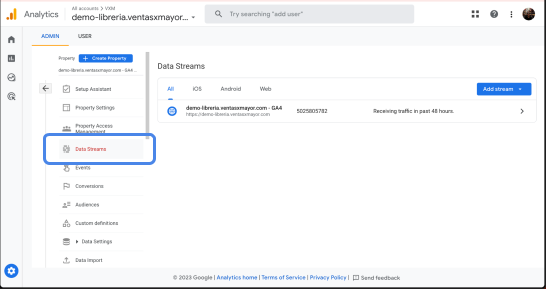
In your GA4 account, go to "Data Streams". Select the stream created by default or add a new one for Web.
Step 2: Copy your Measurement ID
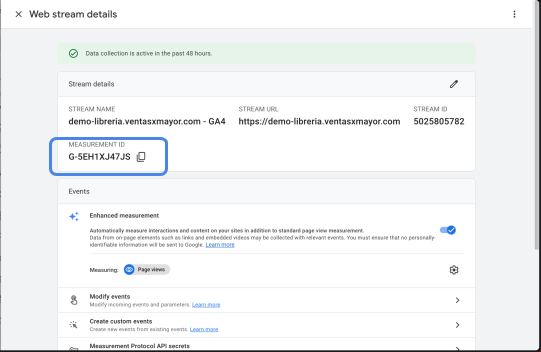
Find the code in "MEASUREMENT ID" (format: G-XXXXXXXXXX) and copy it.
Step 3: Paste the code in your ventasxmayor.com dashboard
Go to your ventasxmayor.com account, navigate to the Advertising section and paste your GA4 Measurement ID. If you had a previous one, replace it with the new one. If this is your first time, simply paste it and save.
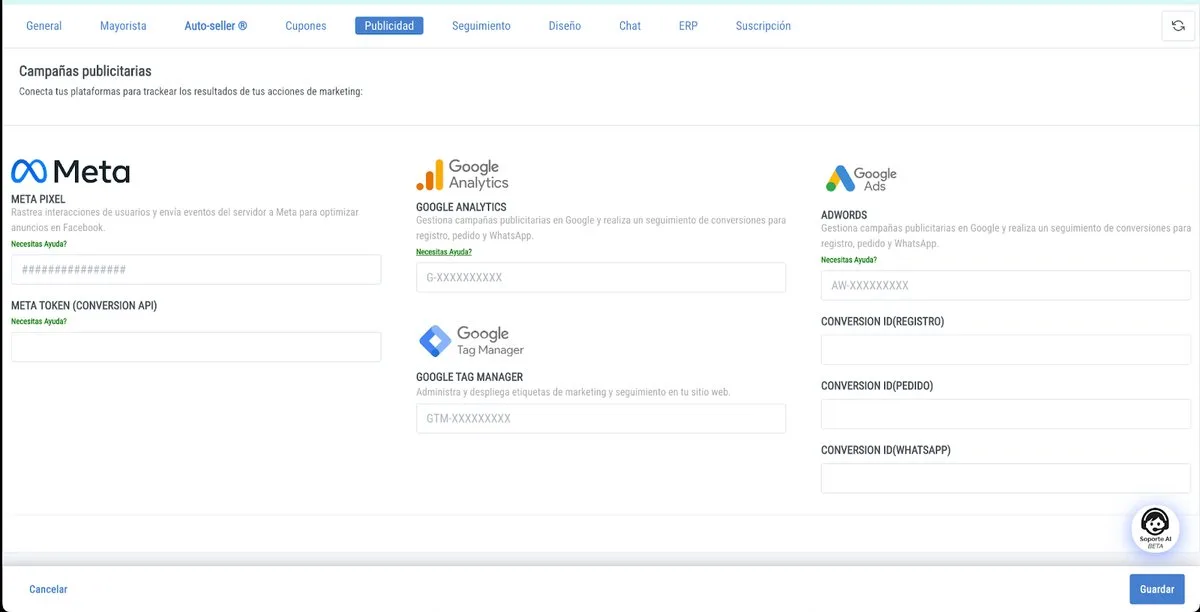
Save the changes in your admin panel. Done: your GA4 is now configured and measuring your wholesale store traffic.