
How to build a wholesale catalog with sizes and colors (without every color being another product)
For the manufacturer of apparel, footwear, stationery or housewares with 300 products and 3,000 variants, selling them today with a PDF and a size spreadsheet. What a variant is, how to build the grid wholesale buyers use, what happens with stock, SKU and price per option, and how to load everything at once.
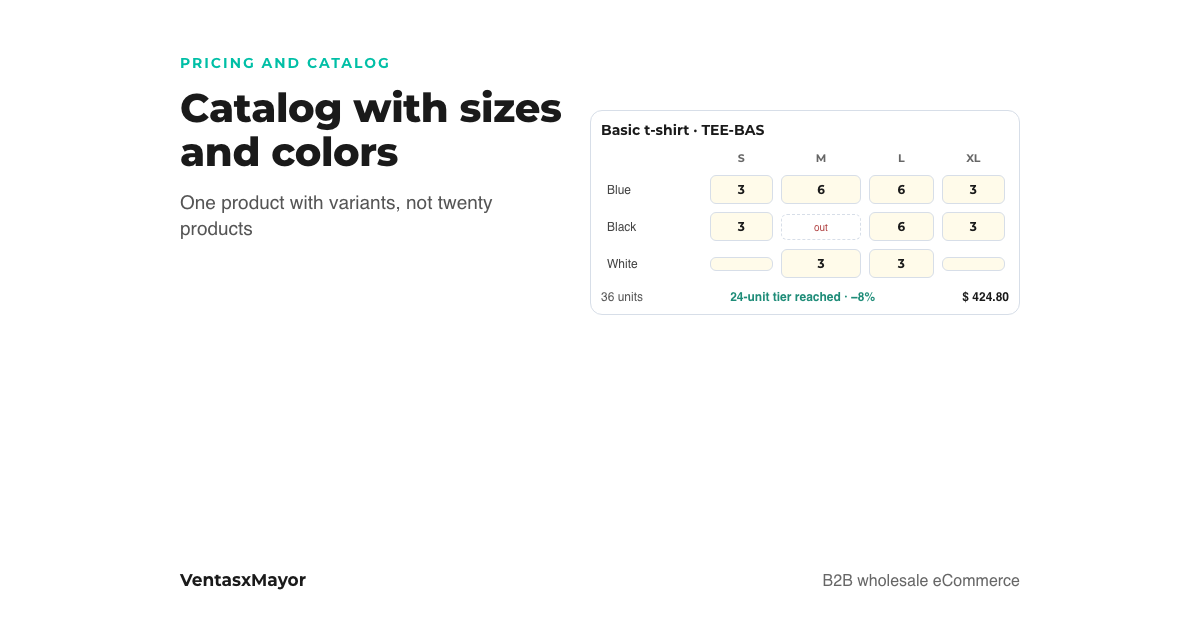
A t-shirt manufacturer with 40 styles, 8 sizes and 6 colors has 1,920 combinations. If every combination is a product in the store, the catalog has 1,920 pages, the buyer cannot find anything and the volume discount is lost because nobody buys 12 blue size-M t-shirts: they buy 12 t-shirts spread across sizes and colors. We see it in apparel, footwear, stationery, housewares, cosmetics: a wholesale catalog is built wrong when the product is the variant.
The right way is the one wholesale buyers have always used: a grid with sizes in one direction and colors in the other, a quantity per cell and the total at the bottom. This article explains how to build that in a store: what a variant is, what data each one carries, how quantity pricing is calculated on the total and how to load the 1,920 rows without typing them.
What a variant is and why it is not another product
A variant is an option of the same product: the size, the color, the scent, the pack size. It shares name, photos, description, category and commercial rules with the product; it has its own SKU, stock, case and, if needed, price.
The difference matters for three reasons. First, the buyer: they search for "basic t-shirt", not "basic t-shirt blue M", and want to see every size and color on one screen. Second, the price: the quantity discount has to be calculated on the product total, because wholesale buyers buy assortments; if every color is a product, they never reach the tier. Third, the setup: rules (price list, tier, promotion) are written once on the product and apply to all its variants, instead of being repeated 48 times.
The grid: this is how a wholesale buyer orders
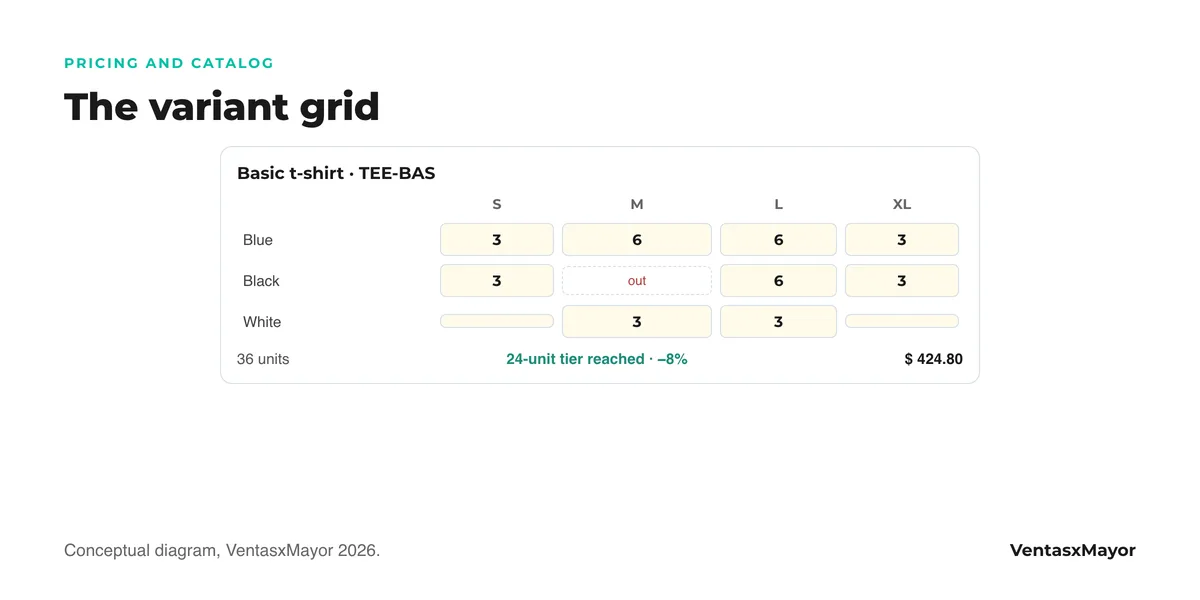
On the product page, the wholesale buyer does not pick "one color and one size" like in a consumer store: they see a table. Sizes in the columns, colors in the rows (or the other way around, depending on the category), and in each cell they type how many units they want. Below, the total units, the total amount and how much they save from the quantity tier they just reached. For the weekly repeat buyer, the same grid shows up in a fast-entry view with the whole catalog in one table.
Three details that make the difference in the grid:
- Stock per cell. If blue M is out of stock, the cell says so; the buyer does not discover the shortage on the packing slip.
- Case per variant. If white sells in 12s and the printed one in 6s, each cell respects its multiple.
- Switched-off variants. A discontinued color is turned off with a switch, without deleting the product or losing its sales history.
What data each variant carries
| Data | Where it lives | Why it matters |
|---|---|---|
| Name, photos, description, category | Product | Loaded once; the color's photo can go on the variant |
| SKU | Variant | It is what the ERP, the packing slip and the warehouse scanner read: "TEE-BAS-BL-M", not "blue t-shirt" |
| Stock | Variant | Blue M sells out before black XL; stock per product is useless |
| Case or multiple | Variant | Each option can sell in 6s, 12s or 24s |
| Price | Product, with exceptions per variant | XXL or the printed one can cost more; the rest inherits the product price on each list |
| Price list, tier, promotion | Product | Written once and applied to every variant |
| Visible / switched off | Variant | Discontinue a color without deleting anything |
The size run and the discount on the total
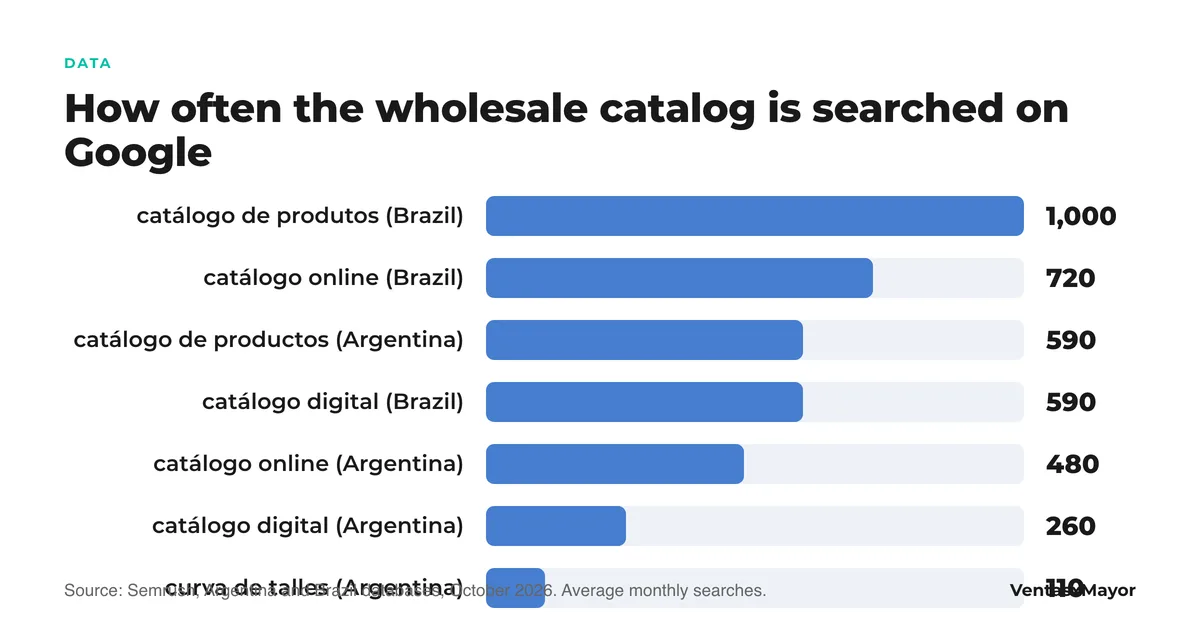
"How much is a size run?" is one of the most searched questions in wholesale apparel. A size run is the minimum assortment the manufacturer sells of a style: for example, 1 S, 2 M, 2 L, 1 XL per color, six units. In the store it is built two ways: as a multiple per variant (each size sells in so many) or, better, as a per-product minimum with the price tier on the total, which lets the buyer build their own run. The volume discount is calculated on the product's units adding up every size and color: 12 t-shirts spread across three colors reach the 12-unit tier, the same as 12 of one color. Mixing does not cost the buyer the price, and that is what makes them buy the assortment.
How to load 2,000 variants without typing them
- One row per variant in the spreadsheet. Product code, name, category, attribute 1 (size), attribute 2 (color), variant SKU, price per list, stock, case. If the ERP exports the item master, it is already in that format or close to it.
- Consistent SKUs. The variant SKU has to be the same in the store, in the ERP and on the warehouse label. "TEE-BAS-BL-M" on all three sides, or the packing slip and the stock will never match.
- Import with a preview. Before applying, see what is new, what changes and what is discontinued. A 2,000-row import without a preview is the fastest way to overwrite prices.
- Photos per color, not per combination. One photo per color is enough; size does not change the photo. File names with the color code so the bulk import assigns them on its own.
- Sync with the ERP. Stock and prices come from the management system and whatever does not match is visible; the store is not a second place to enter data.
How VentasxMayor solves it
In VentasxMayor the catalog with variants works the way the buyer reads it: a paint in six colors is one product, not six. Every color or size is a row on the Options tab, with its SKU, price, stock and case, and it is switched off with a toggle when discontinued. The buyer enters a quantity per cell in the grid and the volume discount is calculated on the product total, so mixing colors does not cost them the price. Price lists, quantity tiers and promotions are set on the product and reach every variant.
Bulk import takes one row per variant from a template or from the ERP file, with a preview that separates what is new, what changes and what is discontinued; with the integration, products, stock and prices come from the management system. And for the repeat buyer, Pro Mode puts the whole catalog in one table with variants as rows.
Checklist to build the catalog with variants
- One product per style; sizes, colors and pack sizes as variants, never as products.
- Variant SKU unique and identical in store, ERP and label.
- Stock and case loaded per variant, not per product.
- Price on the product per list; variant exceptions only where cost changes (XXL, printed).
- Volume discount calculated on the product total, tested with a mixed cart.
- Size run defined as a per-product minimum or per-variant multiple, and explained on the product page.
- One photo per color, with the color code in the file name.
- Import with preview; never apply 2,000 rows blind.
- Discontinued variants switched off, not deleted.
Frequently asked questions
How do I make a wholesale catalog with sizes and colors?+
With one product per style and one variant per size and color, each with its SKU, stock and case. On the product page the buyer sees a grid with a quantity per cell and the volume discount is calculated on the product total. It takes a wholesale platform; in a consumer store the buyer picks one option at a time.
What is a size run?+
The minimum assortment of sizes a manufacturer sells of a style, for example 1 S, 2 M, 2 L and 1 XL per color. In the store it is built as a multiple per variant or, better, as a per-product minimum with the price tier on the total, so the buyer builds their own run.
Is the quantity discount calculated per color or per product?+
Per product, adding up every size and color. That is what makes the wholesale buyer purchase an assortment: 12 t-shirts in three colors reach the same tier as 12 of one color. Calculated per variant, the tier is almost never reached.
Can I load variants from the ERP or a spreadsheet?+
Yes: one row per variant with the product code, size, color, variant SKU, price per list, stock and case. With a preview before applying, to see what is new, what changes and what is discontinued. With the integration, stock and prices come from the management system.
Sources
Next step
A paint in six colors is one product, not six
In VentasxMayor every color or size is a row with its SKU, price, stock and case; the buyer enters a quantity per cell in the grid, the volume discount is calculated on the product total, and variants are imported from a spreadsheet with a preview.

How to make a product catalog: steps, formats and what a PDF cannot solve
What each product record needs, the one-row-per-variant spreadsheet, photos, pricing and the five catalog formats: which one fits a wholesaler and why the PDF falls short.
How to set up a wholesale online store with different prices per customer
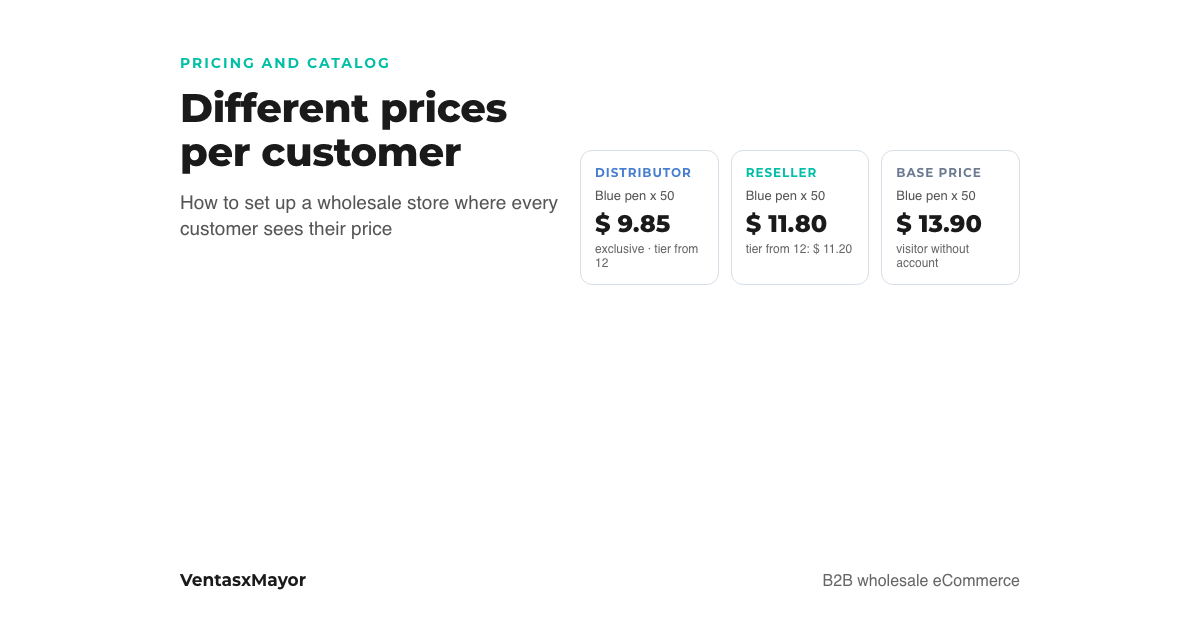
Price lists by buyer type, per-customer discounts and volume tiers: how they combine, how to set up the store step by step and what a visitor without an account sees.
Tiered pricing for wholesale: how to set volume breaks without giving away margin
Volume pricing vs. graduated tiers, five rules for setting the breaks, how tiers combine with per-customer price lists, and where the margin leaks. With a fictional case and chart.