
How to make a product catalog: steps, formats and what a PDF cannot solve
For the wholesaler, distributor or manufacturer who sends the catalog over WhatsApp and rebuilds it every time a price changes. What each product record needs, how to build the spreadsheet, which photos work, the five catalog formats that exist and which one fits how the customer buys.
Almost everything that shows up when you search "how to make a product catalog" is written for someone selling ten items: a Canva template, nice photos, export to PDF and send it over WhatsApp. It works. Until the business has 800 products in three sizes, changes prices twice a month and sells to 200 customers who do not pay the same.
We have been watching that moment for more than eight years at wholesalers, distributors and importers: the 60-page PDF catalog rebuilt every two weeks, the old version still circulating on WhatsApp, and the person who spends Monday updating prices inside a design file. This guide explains how to make a product catalog that still works when the operation grows: what each record needs, how to build the spreadsheet, which photos perform, which formats exist and which one fits how the customer buys.
What a product catalog is (and what each record needs)
A product catalog is the organized list of everything a company sells, with one record per product: code, name, category, variants, selling unit, price, photo and stock. The format (PDF, web, spreadsheet, print) is the output; the record is what matters.
That is the mental shift that stops the monthly rebuild: the catalog is a database with photos, not a design file. If the data is built right once, the PDF, the web page and the customer spreadsheet come from the same source and update together. If the catalog "is" the PDF, every price change is a design job.
What each record needs, in order of importance: code or SKU (unique, short, the one the warehouse uses), name, category with hierarchy (Stationery › Writing › Pens), variant where it exists (size, color, flavor), selling unit (each, pack, case of 12), base price, photo and stock. With code, name, category and price you already have a catalog; the rest is what prevents the questions on WhatsApp.
How to make a product catalog in seven steps
- Define who it is for and where it will be seen. A catalog for the rep who shows it on a phone, one for the customer who orders alone, and one for print are not the same thing. The answer decides the format in step 6.
- Build the master spreadsheet, one row per variant. "T-shirt S/M/L" is not one row: it is three, with the same name and different codes. That is the rule that lets you show one product with a size selector and track stock for each. Minimum columns: code, name, category, variant, selling unit, price, stock. The guide to the product spreadsheet, column by column has the detail and the six mistakes that delay an import most.
- Use codes the warehouse recognizes. Short, unique, no spaces. The code connects the spreadsheet, the photos, the order and the invoice; if it changes depending on who writes it, everything else breaks.
- Shoot the photos with one rule: one folder per product, named after the code. Light background, the whole product, one photo per variant where color matters. The files inside can keep their camera names; what connects them is the folder name. Explained in your product photos, all in one ZIP.
- Set the prices: a base list and the per-customer lists. The catalog price is the base; a wholesaler also has a list for distributors, for resellers, for the large account. If the catalog is going to show prices, it needs to know who it is showing them to. We cover it in wholesale price list by customer.
- Choose the format according to step 1. PDF for print or a one-off send; an online link when price and stock change; a catalog with ordering when the customer needs to buy from it. The table below compares the five.
- Decide how it is maintained. Who changes a price, where, and how that change reaches every output. If the answer is "we rebuild the PDF", the catalog will be out of date most of the month.
The five types of product catalog
People ask "what are the five types of catalogs?" and the answers are usually about design (print, digital, interactive…). For someone who sells, the useful classification is different: what the customer can do with the catalog once it is in front of them.
| Type | When it fits | Updates itself? | Per-customer price? | Can they order? |
|---|---|---|---|---|
| Trade shows, showroom, products that do not change | No | No | No | |
| PDF (Canva, Word, InDesign) | A one-off send over WhatsApp or email; few products | No: every change is a new file | One PDF per list, by hand | No: the order comes back by chat |
| WhatsApp Business catalog | Small business, up to a few dozen products | By hand, product by product | No | Basic cart, no minimums or credit |
| Online catalog (link) | Many products, changing prices and stock | Yes, from the same database | If it has user accounts | Depends on the tool |
| Catalog with ordering (B2B portal) | Wholesaler with recurring customers on different terms | Yes | Yes, once they log in | Yes, with minimum, case size and account |
On the free tools that show up first in search: Canva and templates are fine for a quick, good-looking PDF, and there is nothing wrong with that to get started. The problem is not the tool; it is asking a PDF to do things a PDF cannot do.
What a wholesaler cannot solve with a PDF
Here is the opinion: a PDF catalog sent every week is not digitalization. It is the same paper catalog, faster to send and easier to leave out of date. Four things that appear as soon as the business is wholesale and that no PDF solves:
- The per-customer price. The distributor sees one price, the reseller another, the key account another. With a PDF that is three files, three versions and the risk of sending the wrong list to the wrong person.
- Stock. Last week’s PDF still shows the product that sold out on Tuesday. The customer orders it, the rep writes it down and the warehouse cannot pick it.
- Variants and case size. "Tempera 250 g, six colors, case of 12" is one row in the spreadsheet and one record with a selector on the web; in a PDF it is six photos and a footnote nobody reads.
- The order. The PDF shows; it does not sell. The order comes back over WhatsApp as text or a voice note, someone transcribes it and quantity and code errors appear.
That is why a wholesaler’s catalog ends up being a portal where each customer logs in: they see their price, real stock and variants, and build the order with the minimum and case size already applied. WhatsApp is still useful for notifying and sharing the link; it stops being the place where the order is built.
A catalog generated from the store
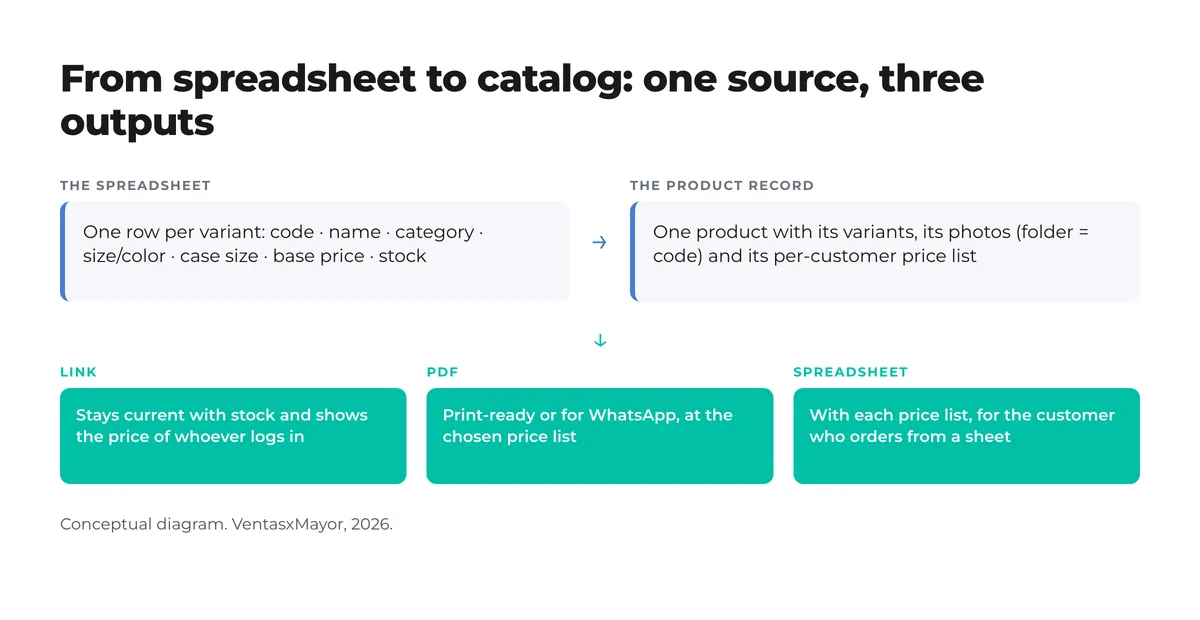
The way to never rebuild the catalog again is for it to come from the same database as the store. In VentasxMayor, the catalog generator takes the real products, with their variants and stock, a template (classic grid, lookbook, compact list) and the price list you choose, and produces the three outputs in the diagram: a link that stays current with stock and shows the price of whoever logs in, a PDF for print or WhatsApp at the chosen list, and a spreadsheet with each price list for the customer who still orders from a sheet. Change a price in the store and the link already shows it; the PDF is re-exported in one click, not a day and a half.
Checklist: the catalog is ready when…
- Every variant is a row with its own code, and no two codes are the same.
- Every product has a category with hierarchy, not a flat list of 40 categories.
- The selling unit (each, pack, case) is in the record, not in the title.
- Every product has at least one photo on a light background, in a folder named after the code.
- There is a base price list and it is known how many other lists exist and for whom.
- The stock the catalog shows comes from the system, not from the warehouse’s memory.
- A price change is made in one place and reaches every output.
- The customer can order from the catalog, or at least the link leads to where they order.
- Nobody has to ask on WhatsApp "does this come in blue?" or "what is my price?".
Frequently asked questions
What are the steps to make a product catalog?+
Define who it is for and where it will be seen; build the spreadsheet with one row per variant; use unique codes; shoot photos into one folder per code; set the base list and the per-customer lists; choose the format (PDF, link, catalog with ordering); and decide how it stays current. The first two steps are 80% of the work.
Where can I create a catalog for free?+
For a PDF, Canva and free templates are enough. For an online catalog that updates itself, most store platforms have a free tier or trial. The right question is not where to make it for free but what the customer needs to do with it: if they need to see their price and order, a PDF will not solve it at any price.
How do I make a PDF catalog to send over WhatsApp?+
With the spreadsheet ready, any Canva template or a catalog generator exports it in minutes: one record per product with photo, code, selling unit and price. What is worth adding is a link to the online catalog on the cover, so a customer who receives an old version can reach the current one and, where applicable, order from there.
What are the five types of catalogs?+
For someone who sells: print, PDF, WhatsApp Business catalog, online catalog (a link) and catalog with ordering (a portal where the customer logs in). They differ in three things: whether it updates itself, whether it shows each customer’s price and whether you can order from it.
What photos does a product catalog need?+
At least one per product, on a light background and showing the whole product; one per variant when color or model matters. You do not need a studio: you need consistency (same light, same framing) and one ordering rule: each photo in the folder named after the product code, so they all load at once.
Sources
- Global Trade Item Number (GTIN) — GS1, consultado el 26 de octubre de 2026
- Especificación de datos de producto — Google Merchant Center, consultada el 26 de octubre de 2026
- Cómo hacer un catálogo de productos digital — Wix, marzo de 2025, consultado el 26 de octubre de 2026
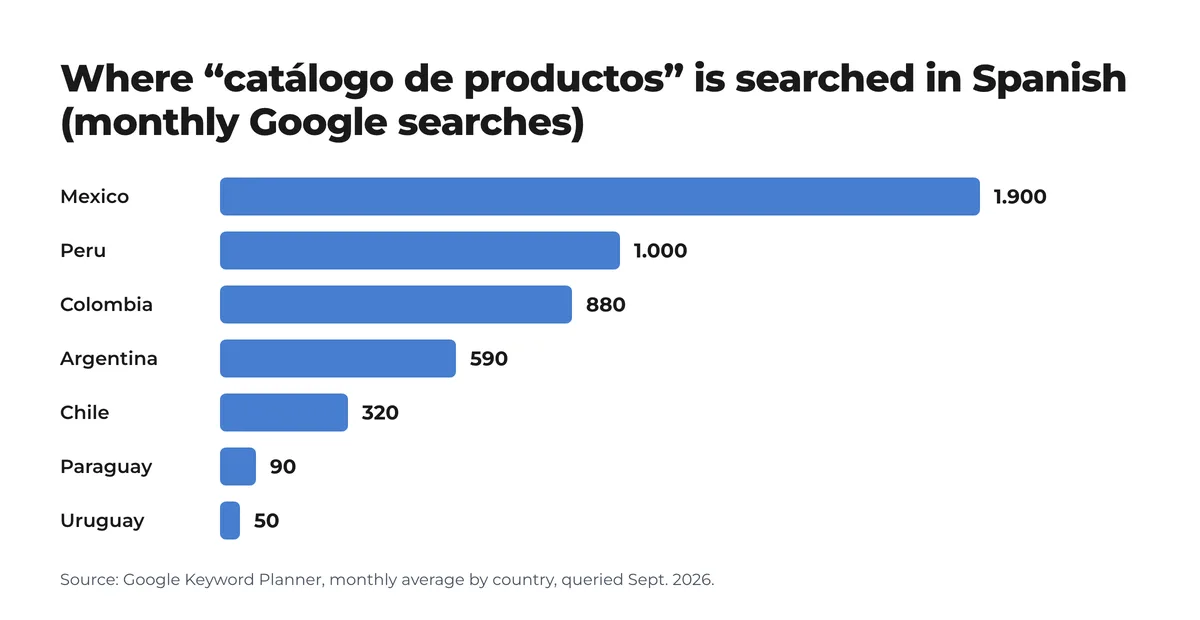
- Google Keyword Planner — promedio mensual de búsquedas por país, consulta de septiembre de 2026
- La planilla de productos, columna por columna — guía de VentasxMayor, 2026
Next step
A catalog that builds itself from your store
VentasxMayor’s catalog generator takes your real products, a template and the price list you choose, and delivers a link that stays current with stock, a print-ready PDF or a spreadsheet with each price list.

Wholesale price list by customer: how to stop emailing 5 different spreadsheets
One master list, three to five tiers, per-customer discounts and an effective-date policy. The method for ending the spreadsheet chase and invoicing the right price.

Wholesale orders on WhatsApp: the complete WhatsApp Business guide to automated messages
Set up automated messages, quick replies and connect WhatsApp with your B2B platform: the portal takes the order, WhatsApp notifies.

B2B customer portal: what it is, what it needs and how to roll it out
What a B2B customer portal is, what it needs for a wholesaler, how it differs from a rep portal and an online store, and how to launch it in five steps.