
How to set up a wholesale online store with different prices per customer
For the wholesaler, distributor or manufacturer who sends three price lists over WhatsApp today and wants every customer to see their own without asking. The three per-customer pricing models, how they combine, how to set up the store step by step and what a visitor without an account sees.
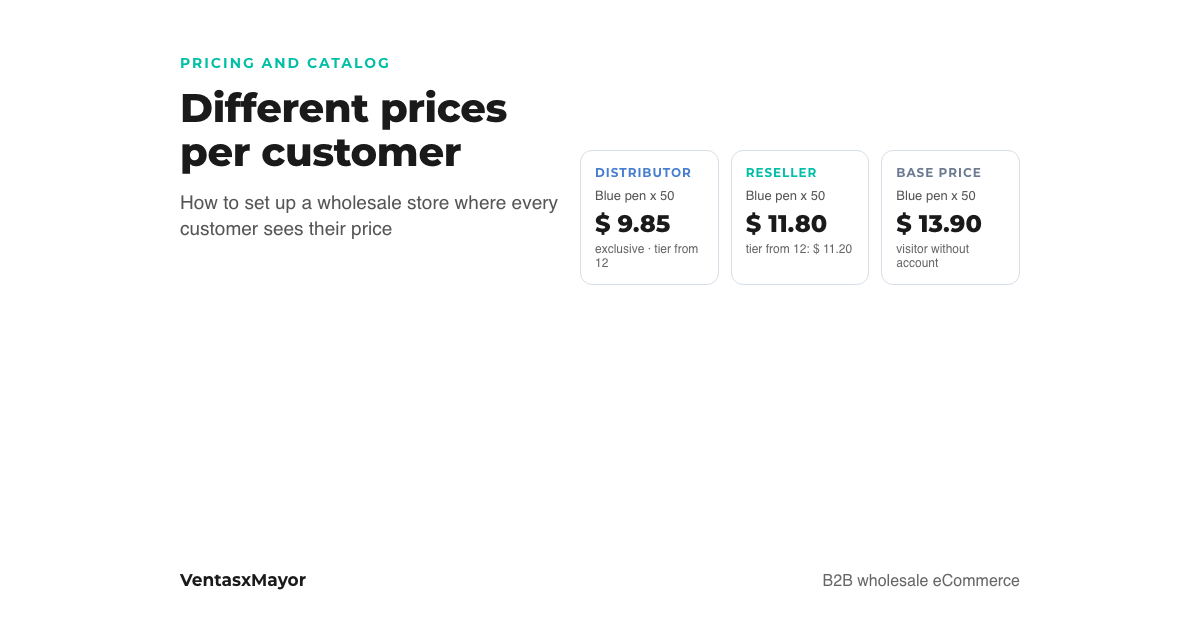
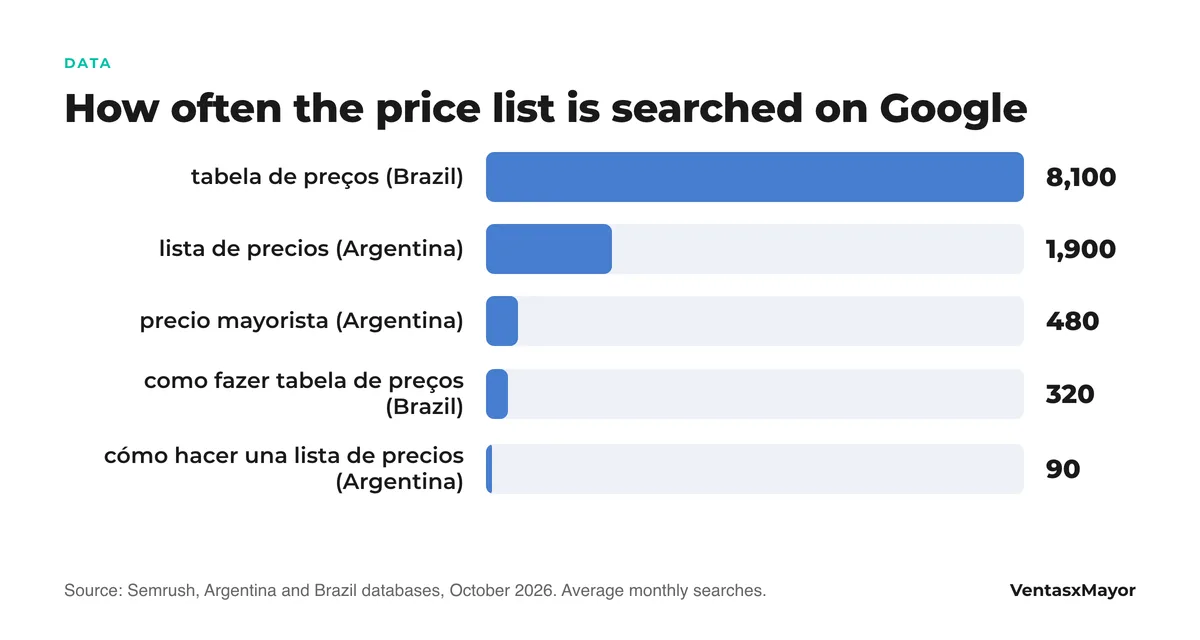
"Can you send me the price list?" is the message a wholesaler receives most often, and the one that hides the most work: someone has to know which of the three lists applies to that customer, whether it is still current, whether they have a separate discount negotiated two years ago and whether they were told about Monday's increase. We run into this at almost every first meeting: the company has different prices for different customers, and the only way to apply them is for one person to remember.
Opening an online store does not solve that on its own. A consumer store behind a password shows everyone the same price; per-customer pricing is exactly what separates a wholesale store from a B2C store with a login. This article explains the three per-customer pricing models, how they combine, how to set up the store step by step and what a visitor without an account should see.
The three per-customer pricing models
Almost every wholesaler uses some mix of these three. They are worth naming separately because they are configured differently and fail differently:
| Model | How it works | Who it suits | Where it fails |
|---|---|---|---|
| Price lists by buyer type | Several lists (distributor, reseller, frequent wholesale buyer); every product has a price on each list; every customer is assigned one list | Clear segments with stable price gaps between them | When there are more lists than real segments: "John's list", "Mary's list" |
| Per-customer discount | A percentage of their own off the base list, negotiated with that customer | Exceptions: the key account, the long-standing customer | When it is used for everyone: nobody knows how much margin is left |
| Volume tiers | The price drops at 6, 12, 24 units or at a given amount; the same for everyone on a list | Rewarding full cases and large orders | When the break is set wrong and the customer pays less for buying the same |
The combination that works best is simple: three or four lists by segment, volume tiers that are the same for everyone, and the per-customer discount reserved for exceptions with a name and a date. When the price list is a PDF, anything else ends up in the rep's memory.
How to set up the store, step by step
The steps are the same on any platform built for wholesalers. What changes is how much of this comes built in and how much has to be patched with stacked apps.
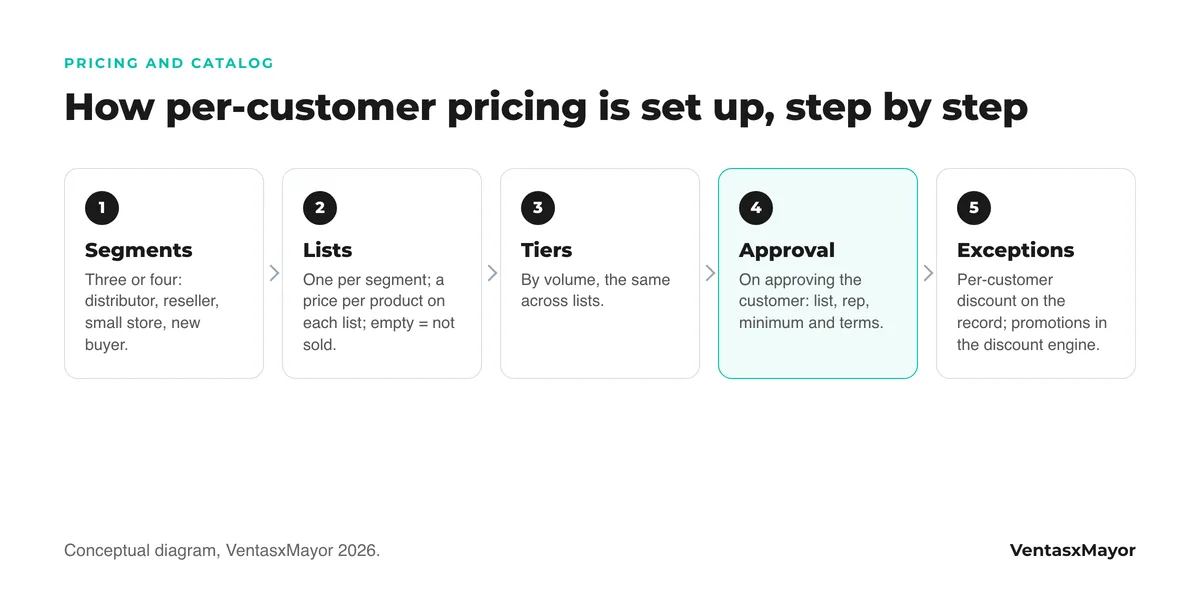
- Define the segments. Three or four, not twelve: distributor, reseller, small store, new buyer. If two segments pay the same, they are one.
- Create one list per segment and enter each product's price on each list. The general list is the base; on the others you type the price or leave it empty, and an empty cell means that product does not exist for that list: that is how exclusive catalogs are built without duplicating anything.
- Set up the volume tiers per product or per category: from 6, from 12, from a full case. The highest tier reached applies, and it should be the same for every list.
- Approve each customer with their list. The sign-up arrives with the questions you configured (line of business, number of stores, area); on approval you pick their list, their rep, their minimum order and their payment terms. From then on their catalog, cart and orders use those prices.
- Reserve the per-customer discount for exceptions, on the customer's record and with a note on why. Promotions (2-for-1, coupon, free shipping) live separately in the discount engine and can be targeted at one list.
- Decide what a visitor without an account sees. Base price, catalog without prices or a closed store. It is covered in how to show prices only to registered customers.
What each customer sees when they log in
The right outcome is two customers with different lists entering the same store and seeing different numbers on the same product, without anyone sending them anything. The distributor sees $13 and an exclusive product the reseller does not see; the reseller sees $16 and the tier "from 12, $15.20"; the visitor without an account sees the base price or no prices, depending on what was decided. The same catalog, loaded once.
There are two layers and they should not be mixed: the list sets the customer's base price and tiers; the discount engine applies promotions on top. If a promotion is loaded as a new list, three months later there are seven lists and nobody knows which one is current.
The mistakes we see
- A B2C store with a password. Hiding the price behind a login is not per-customer pricing: everyone who gets in sees the same thing. That is the exact point where a consumer store stops working for a wholesaler.
- One list per customer. Twelve lists for twelve customers is a PDF per customer under another name. Lists are per segment; the exception is a discount on the record.
- Promotions loaded as lists. October's 10% is not a new list: it is a promotion on top of the list, with an end date.
- The price in two places. If the store has one price and the ERP another, the rep will trust the ERP and the customer the store. An integration or a single source of truth, never two.
- Tiers that cross lists. If the reseller at the 24-unit tier ends up paying less than the distributor, the distributor finds out. Tiers get tested with a sample cart before going live.
How VentasxMayor solves it
In VentasxMayor price lists are native: you create one list per buyer type in a minute, it shows up as a new column on every product and as an option on every customer's record. An empty cell on a list makes that product not exist for that list. When you approve the customer you assign their list together with their rep, minimum order and payment method, and their store changes that instant: they see only the products, prices and tiers that apply to them, from their phone, at any hour.
The discount engine sits on top: percentage promotions, 2-for-1, free shipping or volume tiers, aimed at everyone or at the customers on a given list, with a cart simulator to test them before publishing. And with "customer view mode" you walk through the store exactly as each buyer sees it, without creating orders.
Checklist before publishing prices
- Three or four named segments, and no customer who does not fit one.
- One list per segment; every product priced on every list or left empty on purpose.
- Volume tiers the same across lists and tested with a sample cart.
- Per-customer discounts only on the record, with a note on why and since when.
- Promotions in the discount engine, with an end date, not as new lists.
- A single source of prices: the store, or the integrated ERP.
- Defined what a visitor without an account sees: base price, catalog without prices, or nothing.
- Old PDFs withdrawn and the WhatsApp message pointing to the store.
Frequently asked questions
How do I get each customer to see a different price in my online store?+
With price lists by buyer type: create one list per segment, enter each product's price on each list and, when approving the customer, assign them theirs. From then on, when they log in, they see their list's prices. It takes a wholesale platform; a consumer store behind a password shows everyone the same price.
How many price lists should I have?+
As many as real customer segments: usually three or four. If there are more lists than segments, the difference is better handled with a per-customer discount on the record, or with volume tiers that are the same for everyone.
Can per-customer pricing be combined with volume discounts?+
Yes, and it is the norm: the list sets the customer's base price and quantity tiers; the discount engine applies promotions on top, aimed at everyone or at one list. What does not work is loading every promotion as a new list.
What does someone see entering the store without an account?+
Whatever the wholesaler decides: the general list's base price, the catalog without prices and a sign-up button, or nothing until they are approved. Each option has consequences for Google and for sign-ups; they are compared in the article on prices only for registered customers.
Sources
Next step
One list per customer type, and each one sees only theirs
In VentasxMayor price lists take a minute to create, every product has its price per list and, when the customer is approved, they get theirs assigned: from then on they see only the products, prices and discounts that apply to them, 24/7, from their phone.

Wholesale price list by customer: how to stop emailing 5 different spreadsheets
One master list, three to five tiers, per-customer discounts and an effective-date policy. The method for ending the spreadsheet chase and invoicing the right price.
How to make a wholesale price list in Excel, with a free template, without rebuilding it every month
The columns that cannot be missing, the margin-on-price formula, three lists per customer, how to update it when costs move, and a free Excel template.
Tiered pricing for wholesale: how to set volume breaks without giving away margin
Volume pricing vs. graduated tiers, five rules for setting the breaks, how tiers combine with per-customer price lists, and where the margin leaks. With a fictional case and chart.