
How to make a wholesale price list in Excel, with a free template, without rebuilding it every month
For the wholesaler, distributor or manufacturer who builds the list by hand, sends it by text and rebuilds it when costs move. The columns that cannot be missing, the margin formula almost everyone gets wrong, three lists by customer type, how to update everything with one number, and a template ready to download.

The price list is a wholesaler's most important document and its worst maintained. We see the same thing everywhere: a spreadsheet that started clean three years ago, had columns added, prices pasted by hand, and today circulates in three different versions by text message, one per rep. When cost goes up, someone spends a whole afternoon rebuilding it row by row, and a week later a customer complains they were charged off the old list.
This guide is the hands-on half of our post on price lists per customer: how to build the spreadsheet so it updates with one number instead of being rebuilt. With the exact columns, the margin formula set up correctly, three lists by customer type and an Excel template you can download at the end with all of it already inside.
The columns a wholesale price list cannot do without
A retail price list has two columns: product and price. A wholesale list has to answer four more questions: how many per case, what the minimum is, what the price is for this customer, and since when it applies. Grouped by what they solve, these are the columns:
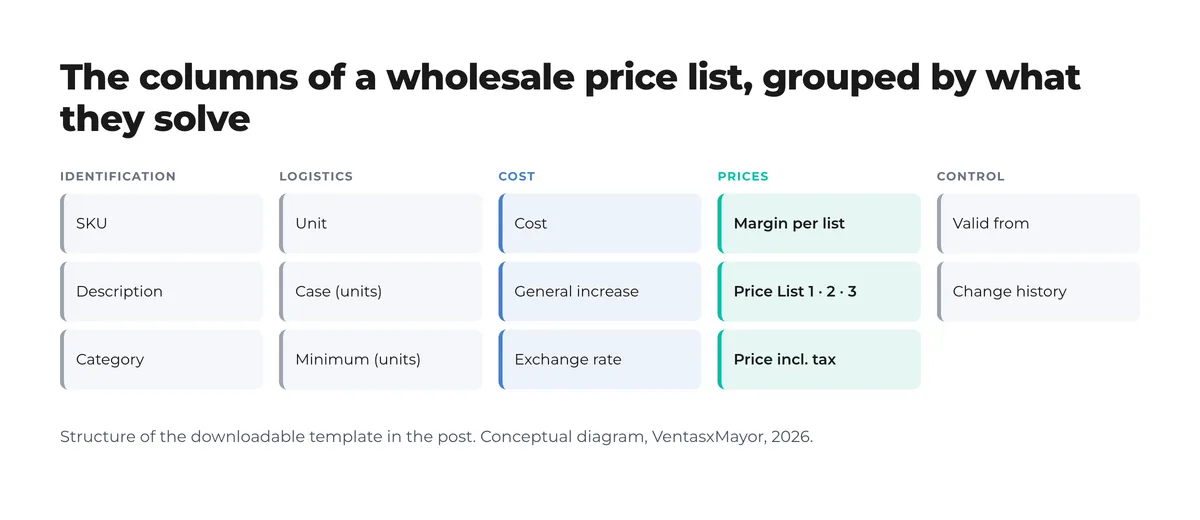
| Column | What it is for | Typical error when missing |
|---|---|---|
| SKU | Identifies the product unambiguously; it is what travels to the ERP and the order | Two different "8 oz cup"; the customer orders one and gets the other |
| Unit and case | Says whether the price is per unit, sleeve or case, and how many units it holds | The customer thinks they pay for the case and it was the sleeve |
| Minimum | Minimum quantity per product; avoids breaking cases | 3-unit orders that cost more to ship than they earn |
| Cost | The only column that changes when the supplier raises prices | Prices updated "by eye" and margin lands wherever it falls |
| Margin per list | One percentage per customer type; the price comes out of a formula | Discounts negotiated one by one, with no rule |
| Price per list (1, 2, 3) | Walk-in, retailer, distributor: each customer sees theirs | A single list and "we'll sort it out by text" |
| Valid from | Since when it applies; printed on the PDF | Disputes over the old list, with no way to prove which one applied |
Margin on price, not markup on cost
This is the most expensive mistake we see in hand-built lists. "I add 30%" almost always means multiplying cost by 1.30. That is markup: 30% on top of cost. Margin, which is what stays from every dollar sold, is something else: with cost 100 and price 130, margin is 30 ÷ 130 = 23.1%, not 30%. When the owner says "I work on 30 margin" and the spreadsheet multiplies by 1.30, there are seven points of difference nobody sees until the year-end statement.
The right formula divides, it does not multiply:
Price = Cost ÷ (1 − Margin). With a $100 cost and a 30% margin: 100 ÷ 0.70 = $142.86. Multiplying by 1.30 gives $130 and leaves 23.1%.
| "I add…" | Price with markup (× 1.X) | Real margin it leaves | Price with margin (÷ (1 − X)) |
|---|---|---|---|
| 20% | $120.00 | 16.7% | $125.00 |
| 30% | $130.00 | 23.1% | $142.86 |
| 40% | $140.00 | 28.6% | $166.67 |
| 50% | $150.00 | 33.3% | $200.00 |
How to build the list in Excel step by step
- A parameters sheet. Four cells: tax, general increase, exchange rate and valid-from date. Every formula points there. It is what lets you update the whole list by changing one number.
- One row per variant, not per product. If the cup comes in 8 oz and 12 oz, that is two rows with two SKUs. Same rule as the product catalog: what sells separately is listed separately.
- Cost in a single column. Tax-exclusive, in the currency you buy in. If the supplier quotes in another currency, the cost goes in that currency and the exchange rate in parameters.
- A margin per list, not a price per list. Three margin columns (walk-in, retailer, distributor) and three price columns computed with ÷ (1 − margin). Changing one margin updates every price on that list.
- Case and minimum next to the price. So whoever reads the list does not have to ask. And so volume tiers, when they exist, line up with the case.
- A history sheet. Date, percentage applied, reason, who. It is what lets you tell a customer "this list applies from October 1 and went up 3% on the supplier increase".
The template ships with the three sheets (Price list, Parameters, History), formulas in place, yellow cells to fill in and four fictional example rows. It opens in Excel, Google Sheets or LibreOffice. Download the wholesale price list template (.xlsx). Once the sheet is filled in, the free price list generator turns it into a PDF with your logo and terms of sale, ready to send.
How to update it when costs move, without rebuilding it
With the spreadsheet built this way, updating means changing the "general increase" cell in Parameters: 0.03 and every price goes up 3% while keeping each list's margin. You review it, log it in History, change the valid-from date and export the PDF. Once the increase is confirmed, it moves into the cost column and the parameter goes back to zero. If one category's supplier raised prices and the others did not, only those rows' cost gets updated.
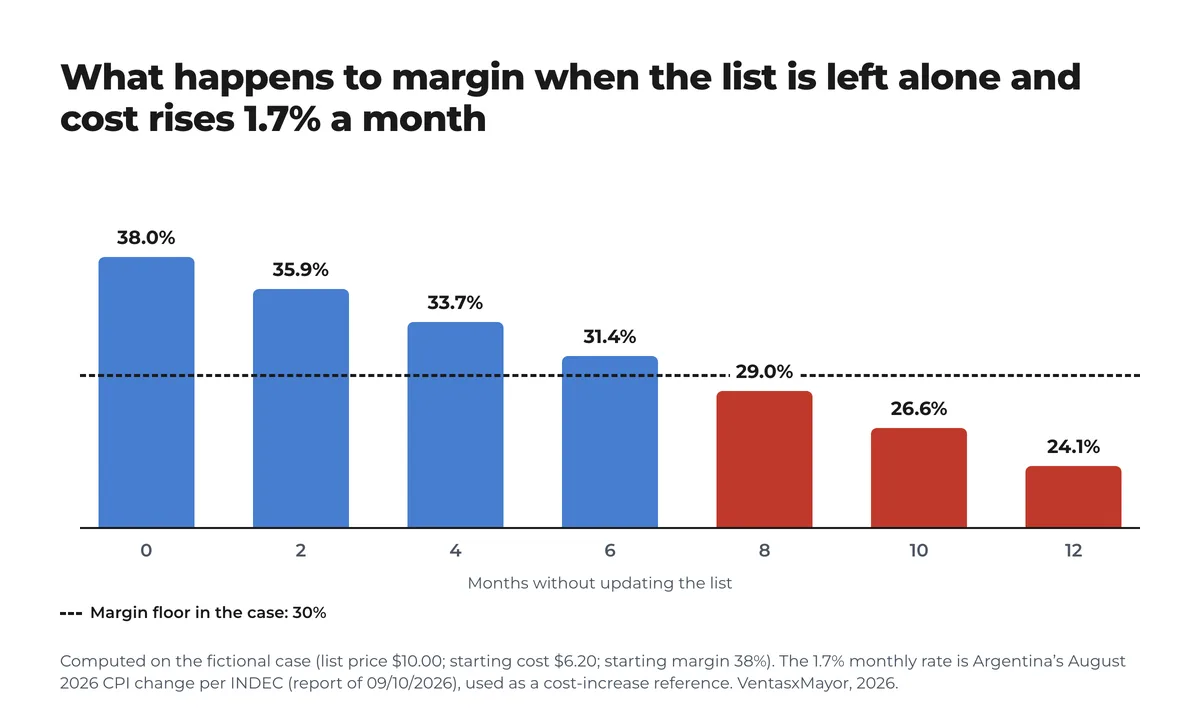
What does not work is leaving the list alone "until it adds up". In a market like Argentina, where the August 2026 CPI rose 1.7% in the month (33.5% year on year, per INDEC), a list that is not touched loses about a point of margin per month: in the chart's fictional case, the starting 38% crosses the 30% floor before month eight. In a low-inflation market the erosion is far slower, but it still shows up, usually through the exchange rate on imported goods rather than the price index.
When the spreadsheet stops being enough
A well-built spreadsheet solves the calculation. It does not solve distribution. The day there are three lists, five reps and 300 accounts, the problem is no longer how the price is computed but how the right price reaches each customer at the moment they order. A PDF by text is a snapshot of the list: a week later there are customers looking at the old snapshot, and the rep answering "which list do you have?".
The signs that the spreadsheet is no longer enough are always the same: more than one version of the list is circulating; a customer disputes a price that no longer applies; the rep spends more time answering price questions than selling; and the update gets postponed because "then we have to send it to everyone". At that point the list has to live in one place where each customer logs in and sees theirs. In the Gartner survey published in March 2026, 67% of B2B buyers prefer to complete a purchase without talking to a sales rep; the first step of that purchase is seeing the price without having to ask for it.
- 1.7%Argentina's CPI rise in August 2026; 33.5% year on yearINDEC, 10/09/2026
- 4.22%Brazil's IPCA over twelve months to August 2026IBGE, set 2026
- 67%of B2B buyers prefer to buy without talking to a sales repGartner, mar 2026
How VentasxMayor handles it
The spreadsheet in this post is imported as is: each list is one more column and each customer is then assigned to theirs from the admin. The buyer logs in and sees only their price, with case size and minimum next to it, at the moment of ordering; no stale PDF is possible. Percentage updates are made from the admin and reach every customer instantly, and price lists per customer coexist with volume tiers and net terms. If the catalog already lives in an ERP, it gets exported from there and we map it.
Checklist for building the list this week
- Download the template and paste the current list: one row per variant, with a SKU.
- Fill in unit, case and minimum for every product; ask the warehouse for what is missing.
- Enter tax-exclusive cost in the purchase currency; the exchange rate goes in Parameters.
- Set three margins (walk-in, retailer, distributor) and confirm they are margin on price, not markup.
- Compare the computed prices with the current ones: every large gap is a price that was wrong.
- Set the valid-from date and make the first History entry.
- Export one PDF per list with the valid-from date visible.
- Delete the old spreadsheet and text-message versions; keep a single source.
- Schedule the next cost review: monthly where costs move fast, quarterly otherwise.
Frequently asked questions
How do I make a price list in Excel?+
With three sheets: Parameters (tax, general increase, exchange rate, valid-from date), Price list (one row per variant with SKU, unit, case, minimum, cost, one margin per list and the price computed as cost ÷ (1 − margin)) and History. The template in this post is already built that way.
What is the difference between margin and markup?+
Markup is computed on cost (cost × 1.30); margin, on the selling price (what stays from every dollar sold). A 30% markup leaves a 23.1% margin. To get a 30% margin you divide cost by 0.70.
How often should a wholesale price list be updated?+
Every time cost changes, and at least monthly wherever costs move fast: at 1.7% a month (Argentina's August 2026 CPI, INDEC) an untouched list loses about a point of margin per month. With the spreadsheet built properly, updating means changing one cell and exporting the PDF.
Should I send the price list by WhatsApp?+
It works to announce a new list, not to distribute it. A PDF by text is a snapshot: a week later some customers are looking at the old one. The list has to live in one place where each customer logs in and sees theirs with the valid-from date; the message carries the link.
Sources
- INDEC — Índice de precios al consumidor, agosto de 2026: 1,7 % mensual, 33,5 % interanual (informe técnico del 10/09/2026; consultado el 17 de septiembre de 2026)
- IBGE — Inflação: IPCA de agosto de 2026, −0,32 % no mês e 4,22 % em doze meses (consultado el 17 de septiembre de 2026)
- Digital Commerce 360 — Gartner: two-thirds of B2B buyers prefer rep-free purchasing (17 de marzo de 2026)
- Requisitos del catálogo: cómo se carga la planilla — VentasxMayor, 2026
Next step
The same spreadsheet, loaded once, with each customer's price
In VentasxMayor the spreadsheet is imported as is: each list is a column, each customer is assigned to theirs and sees only their price. Percentage updates are made from the admin and reach everyone instantly.

Wholesale price list by customer: how to stop emailing 5 different spreadsheets
One master list, three to five tiers, per-customer discounts and an effective-date policy. The method for ending the spreadsheet chase and invoicing the right price.

Tiered pricing for wholesale: how to set volume breaks without giving away margin
Volume pricing vs. graduated tiers, five rules for setting the breaks, how tiers combine with per-customer price lists, and where the margin leaks. With a fictional case and chart.

How to make a product catalog: steps, formats and what a PDF cannot solve
What each product record needs, the one-row-per-variant spreadsheet, photos, pricing and the five catalog formats: which one fits a wholesaler and why the PDF falls short.